Overload documentation
Run it, point it at your own accounts, ship it under your own brand. Written against version 1.0.0 of the download you get on CodeCanyon.
- Version v1.0.0
- Updated Sep 2026
- Platform Flutter
- Stack Flutter · Firebase
- Demo APK · v1.0.0 · Android 7.0+
On this page
Overview
Overload is a workout logger, not a workout library. It is the complete Flutter source for an Android and iOS app that records sets in a gym: weight, reps, rest, personal records, progress over time.
The distinction matters commercially. Almost every fitness app on this marketplace is a preset-routine library with bundled demonstration videos, GIFs and photographs. Overload ships zero media assets. There is no video to license, no image rights to verify, and nothing to re-source when you publish under your own brand. The exercise catalogue is 590 text-only records from a public-domain dataset, bundled as one JSON file.
It is built for an intermediate lifter training three to five times a week, on bad gym connectivity, one-handed, between sets. Logging a set is one tap. The app works fully offline.
What it is not
Stated plainly here rather than discovered after purchase:
- No exercise videos, GIFs, images or illustrations — text records only.
- No preset training programmes or content library. Three minimal starter routines are offered during onboarding and are obviously editable.
- No AI or automated coaching.
- No web or desktop build. Android and iOS only.
- No backend code. Firebase only — there are no Cloud Functions and no server to deploy.
- No trainer/client, gym-management or admin roles.
- No Apple Health, Health Connect or wearable sync.
- No nutrition or calorie tracking, no social feed.
- English only. There is no localisation layer, no
intland no ARB files. - No Firebase, RevenueCat or AdMob account, and no Play Console or Apple Developer membership. These are third-party services with their own pricing — some of them paid — and you sign up for each yourself. Read Third-party services and their costs before you buy.
- No design source files. The Overload icon and splash ship for both platforms, but they are drawn from geometry by a Python script rather than authored in Illustrator or Figma — you change two colour constants and re-run it. There is no
.aior.figto open.
Screens
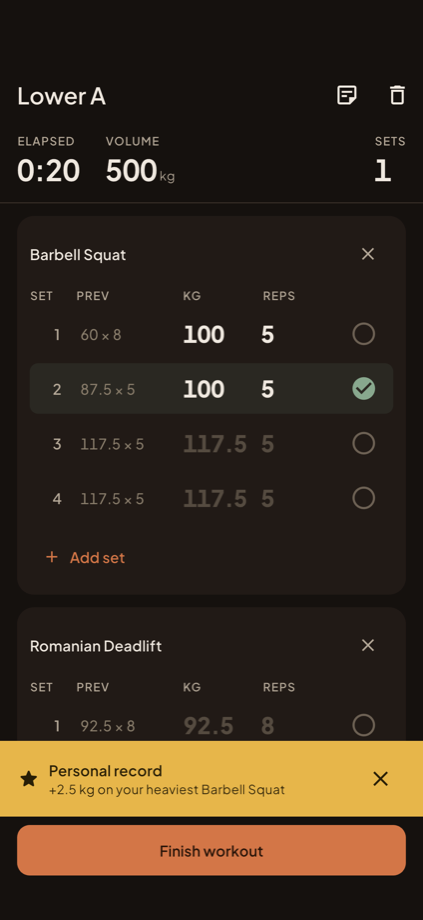
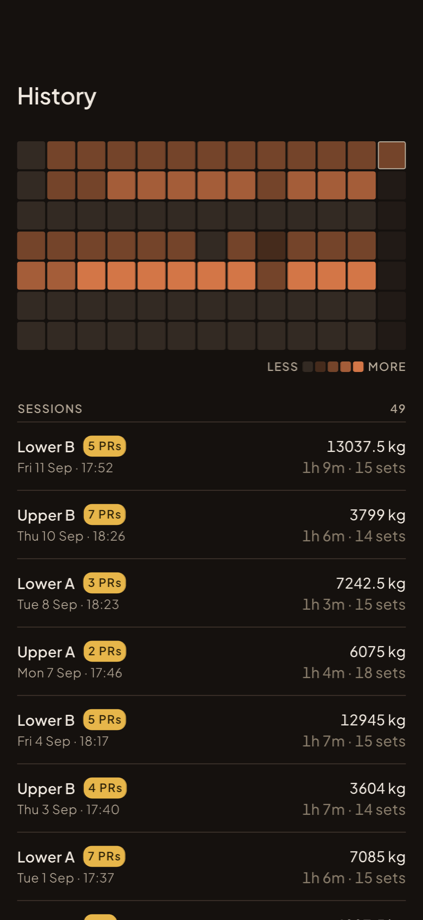
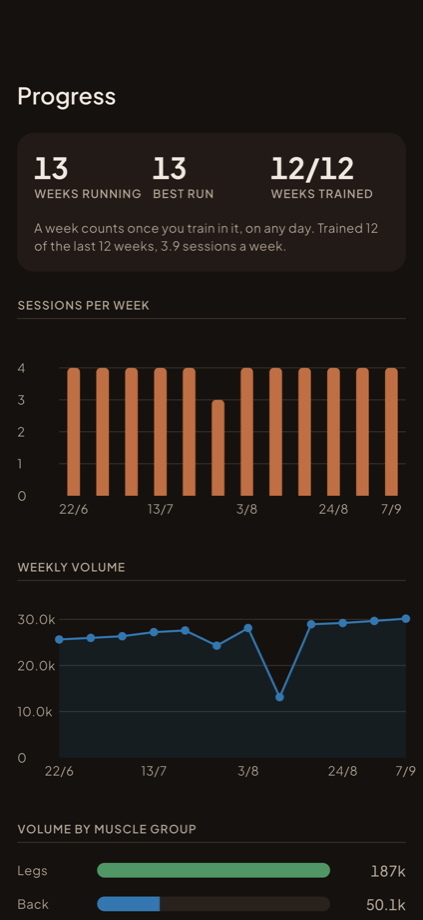
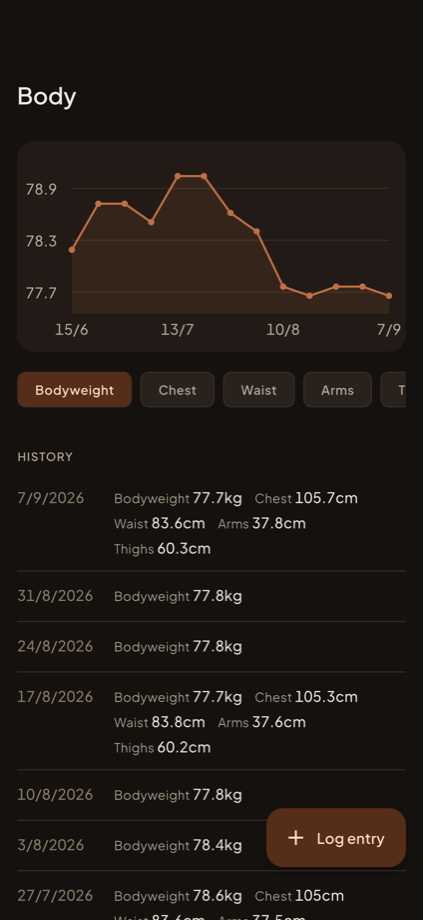
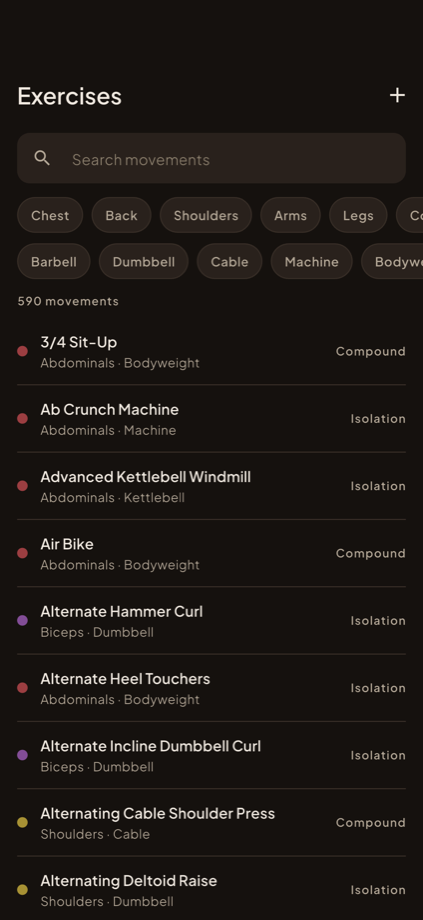
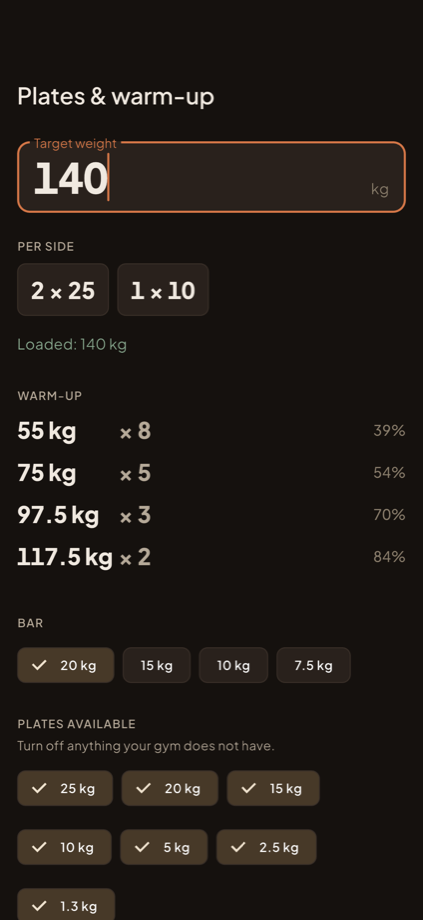
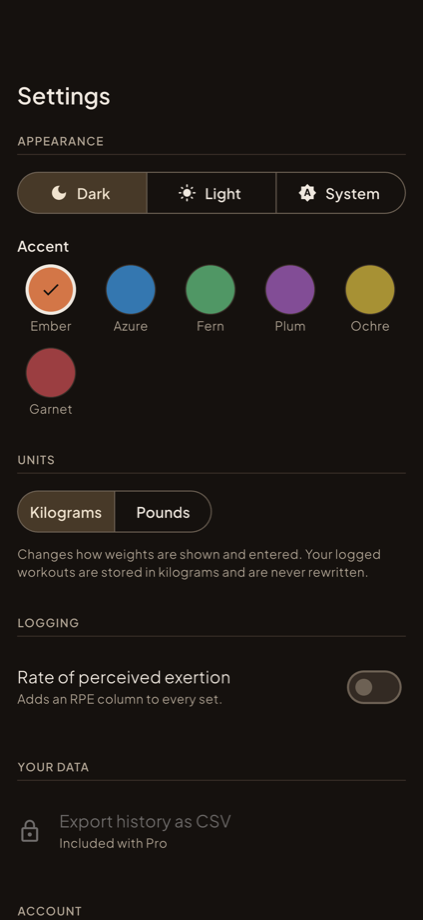
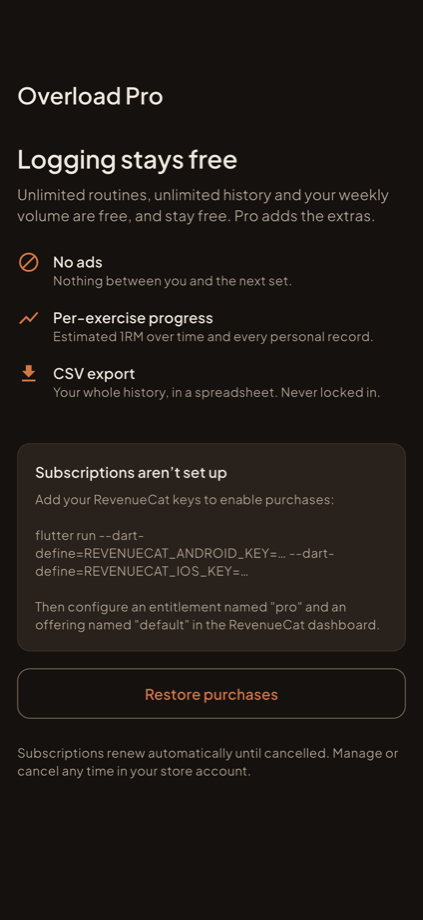
Every screen below is a real screenshot from the app, in roughly the order you meet them. Nothing here is a mockup or a render. The content is the output of the bundled demo seeder — about 13 weeks of plausible training history — which is what your own build looks like once you have run Demo data.
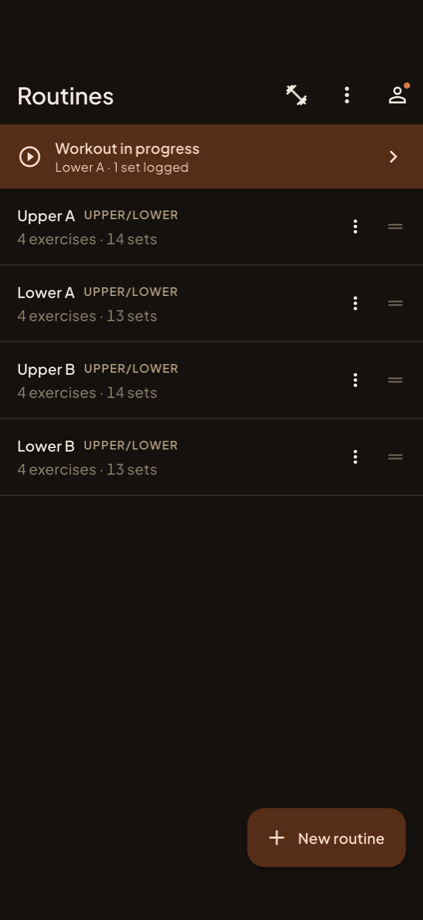
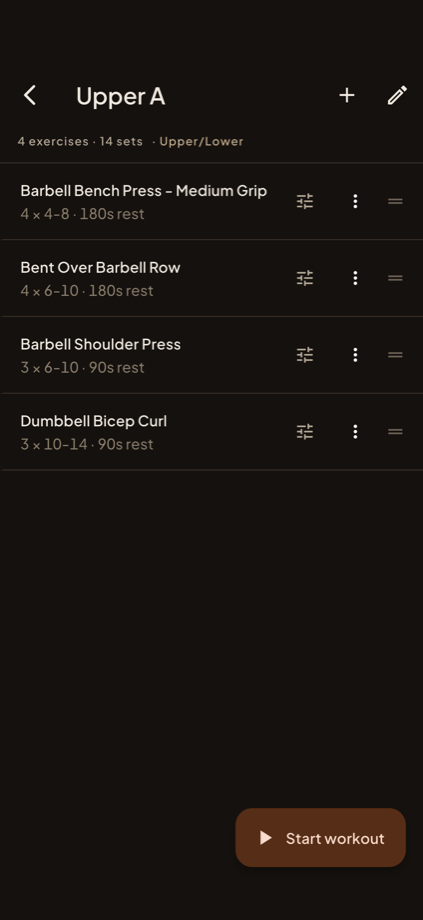
4 × 4–8 · 180s rest. Drag to reorder, group into supersets, then Start workout opens a session pre-filled from those targets.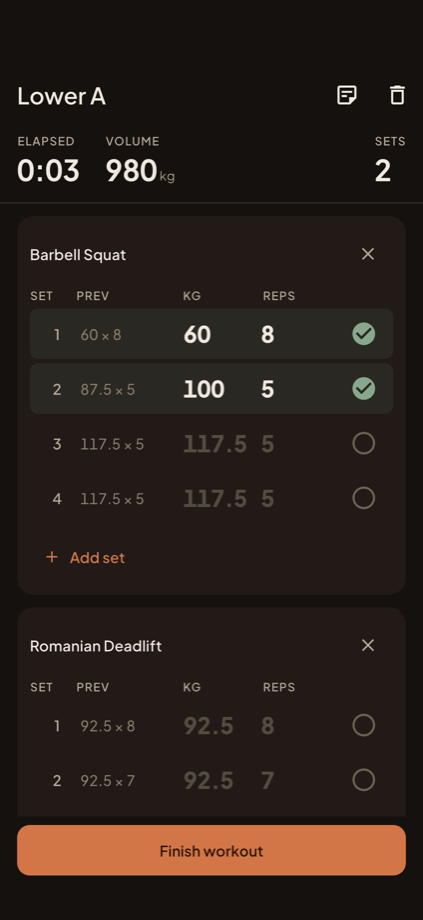
PREV shows last session. The dimmed 117.5 × 5 on rows 3 and 4 is ghost text, not saved data: tap the toggle on an empty row and it fills from last time in one tap. Elapsed, volume and set count run live in the header.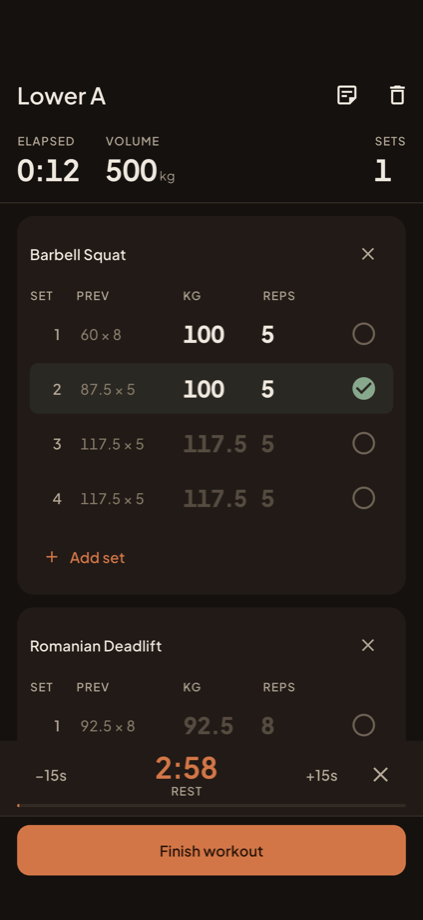
What’s included
- Complete Flutter source for one app targeting Android and iOS.
- 590-exercise catalogue as a bundled JSON asset, public domain, licence archived in
LICENSES/. firestore.rules— restrictive security rules, plusfirestore.indexes.json.- A rules test harness under
tools/rules_testfor the Firebase emulator. - RevenueCat subscriptions and AdMob, both fully wired, both optional, shipping with test credentials so the app runs before you configure anything.
- The Hearth design system — hand-authored light and dark themes, one palette file, a bundled type scale.
- Three starter routines as editable seed data.
- An in-app demo data seeder for filling a fresh install with 13 weeks of plausible history (debug builds only).
- 370 automated tests plus on-device integration tests that run against a real Firebase project.
- Buyer documentation:
README.md,SETUP.md,REBRANDING.md,TROUBLESHOOTING.md. - Six months of item support.
Features
Logging a workout
- One-tap set logging. Last session’s numbers appear inline as ghost text; tapping the completion toggle on an empty row fills them in.
- Rest timer with a wall-clock deadline, so a timer backgrounded for two minutes returns correct. Fires a local notification when the app is suspended.
- Sessions survive backgrounding and force-quit. A workout in progress is always resumable.
- Warm-up sets, drop sets and failure sets; per-set and per-session notes; optional RPE column.
- Supersets, exercise reordering mid-session, and adding an exercise on the fly.
- Automatic personal records on heaviest weight, best estimated 1RM (Epley) and session volume — announced the moment they happen.
Routines and exercises
- Routine builder with drag reorder, supersets, folders and per-exercise targets (sets, rep range, rest).
- 590 searchable, filterable movements — prefix-per-word search across name, muscle group and equipment.
- Custom exercises, merged into the same search as the seeded catalogue.
- Three starter routines offered at onboarding, plainly editable.
History and progress
- Session history with a calendar heatmap, editable past sessions, and repeat-a-workout.
- Per-exercise progress: estimated 1RM over time, heaviest set, per-session volume, and every record.
- Aggregate progress: sessions per week, weekly volume, volume by muscle group, and a training streak.
- Body metrics — bodyweight plus seven measurements, charted over real elapsed time.
- Plate calculator and warm-up ramp.
- CSV export of the full history, exported in kilograms with the unit named in the header.
Platform
- Offline-first. Firestore local persistence is enabled with an unlimited cache; logging works with no signal and syncs when one returns.
- Anonymous-first auth. The app signs in anonymously on launch, so there is always an account. Creating a real one links the credential and preserves the same uid — data is never migrated or copied, so it cannot be lost.
- Email/password, Google and Apple sign-in. Account deletion in-app, which both stores require.
- Kilograms and pounds. Weights are always stored in kilograms; the setting affects display and input only.
- Light and dark themes, dark by default, plus six selectable accent colours.
Architecture
Project layout
lib/
  main.dart                       app entry, Firebase init, offline persistence
  config/
    app_config.dart               THE config file — name, AdMob IDs, RevenueCat, flags
    routes.dart                   GoRouter: every route and the redirect gate
    providers.dart                app-wide Riverpod providers
    theme/
      app_theme.dart              public entry point
      app_palette.dart            the only file containing hex values
      app_color_scheme.dart       hand-authored Material 3 ColorSchemes
      app_typography.dart         the type scale
      app_spacing.dart            spacing, radius, motion
      overload_colors.dart        ThemeExtension for domain colours
  core/
    utils/  widgets/              shared helpers and widgets
  data/
    models/                       freezed models mirroring the Firestore shapes
    repositories/                 one per collection — the only Firestore callers
    services/                     auth, purchases, ads, notifications, CSV export
  features/
    <feature>/
      presentation/               screens and widgets
      providers/                  Riverpod providers for that feature
assets/
  data/exercises.json             590 movements, text only
  data/starter_routines.json      three editable starter routines
  google_fonts/                   bundled type, five weights
firestore.rules                   security rules — deploy these
firestore.indexes.json
tools/rules_test/                 emulator test harness for the rules
test/                             370 unit and widget tests
integration_test/                 on-device tests against a real Firebase project
Stack
Notifier / AsyncNotifierDesign invariants
These are the rules the codebase holds itself to. Breaking one is where bugs come from, so they are worth knowing before you edit.
- Widgets never touch Firestore. Widget → provider → repository, one direction. The classes in
lib/data/repositories/are the only Firestore callers. - Weights are always stored in kilograms. The kg/lb setting affects display and input only and must never mutate a stored value.
- Hex literals live only in
app_palette.dart. Everything else reads from theColorSchemeor from theOverloadColorstheme extension, which is what makes a rebrand a one-file change. - The seeded exercise catalogue is local, not in Firestore. It is identical for every user, so per-account copies would cost reads for nothing. Only custom exercises are stored per user.
- Generated code is committed.
*.freezed.dartand*.g.dartare in the repository, against the usual Dart convention, so the project compiles from a fresh clone without anyone first discoveringbuild_runner. Re-run codegen and commit the output when you change a model. - Anything rendering aligned numbers uses a metric text style carrying tabular figures, so weight and rep columns do not twitch as digits change.
- English only. User-facing strings are plain literals in the widget that renders them.
Requirements
Third-party services and their costs
Every price above is set by its provider, not by us, and can change without notice. Treat the figures here as a starting point and confirm the current terms on each provider’s own pricing page before you budget or commit.
Item support covers this code. It does not cover your bills. We will walk you through connecting each service; we cannot supply the accounts, absorb their charges, or intervene in a billing or account-approval decision made by Google, Apple or RevenueCat.
Setup
flutterfire configure. Until you do, the project will not build.Toolchain
# Confirm your Flutter version
flutter --version        # expect 3.47.2

# Install the Firebase tooling
npm install -g firebase-tools
dart pub global activate flutterfire_cli

firebase login
Create a Firebase project
- 01Create a project in the Firebase console.
- 02Under Build → Authentication → Sign-in method, enable Anonymous (required — the app signs in anonymously on launch), plus Email/Password, and Google and Apple if you want them.
- 03Under Build → Firestore Database, create a database. Choose a region close to your users; it cannot be changed later.
Connect the app to your project
cd overload
flutter pub get

flutterfire configure \
  --project=your-project-id \
  --platforms=android,ios
That command writes three files, all deliberately gitignored:
main.dart..example files ship next to the last two so you can see the expected shape.
applicationId or the iOS bundle identifier, re-run flutterfire configure. The generated files embed the identifier, and a mismatch produces a runtime failure that is easy to misread as a code problem.Deploy the security rules
This is the step reviewers check and the one most commonly skipped. A Firestore database created in test mode is open to the world and expires after 30 days.
cp firebase.json.example firebase.json    # if you do not already have one
firebase use --add                        # select your project

firebase deploy --only firestore:rules,firestore:indexes
Run it
flutter devices
flutter run -d <device-id>
On first launch the app signs in anonymously and takes you through onboarding: training goal, experience, units, and an offer to install the three starter routines. All of it is skippable.
Data model and security rules
users/{uid}
  displayName, email, units, theme, accentColor,
  onboardingComplete, showRpe, isPro, createdAt

users/{uid}/exercises/{id}          custom exercises only — the 590 seeded live in assets
users/{uid}/routines/{id}
users/{uid}/sessions/{id}           status: active | completed | discarded
users/{uid}/records/{exerciseId}    denormalised, so a PR check mid-set is one read
users/{uid}/measurements/{id}
Why it is shaped this way
- Everything lives under
users/{uid}. The data model is deliberately single-user — there is no gym-management or trainer/client seam — which makes the security rule simple and the audit trivial. - Records are denormalised on purpose. Checking whether a set is a personal record happens mid-workout, so it must be one document read rather than a scan over history.
- Sessions carry a status. Discarded sessions are stored as discarded and never appear in history or in any aggregate.
The rules
firestore.rules restricts every path to request.auth.uid == uid with a deny-all fallthrough. Clients cannot write isPro — the subscription state is mirrored onto the profile for instant UI, but RevenueCat remains the source of truth and the rules forbid a client granting itself Pro.
A test harness for the Firebase emulator ships under tools/rules_test, and integration_test/app_test.dart asserts the deny cases against a real project on a device.
Optional integrations
Every integration below is optional and degrades cleanly. A fresh clone with nothing configured runs, logs workouts, and does not crash or show a broken screen. That is a hard requirement of the codebase, not an accident.
flutterfire configure--dart-define=REVENUECAT_ANDROID_KEY=… --dart-define=REVENUECAT_IOS_KEY=…AdMobConfig + both native manifests--dart-define at build time. The AdMob values in AppConfig are Google’s public test IDs, which are safe to ship and safe to click. There is no .env, and there are no server-side secrets, because there is no server.Subscriptions (RevenueCat)
Pro is not a wall in front of logging. Everything core is free: unlimited routines, unlimited history, and the aggregate progress view. Pro removes ads and unlocks CSV export and the per-exercise charts.
The gate is defined in one place, in FreeTier inside lib/config/app_config.dart:
abstract final class FreeTier {
  static const int? maxFreeRoutines = null;   // null = unlimited
  static const int? freeHistoryDays = null;   // null = all of it
  static const bool csvExportRequiresPro = true;
  static const bool advancedChartsRequirePro = true;
}
The capped model is fully implemented and simply switched off. Set maxFreeRoutines to 3 and freeHistoryDays to 30 and the allowance logic starts enforcing again with no other change — which is why they are nullable rather than sentinel numbers.
Configuring it
- 01Create a RevenueCat project and connect your Play Console and App Store Connect apps.
- 02Create products in each store first. RevenueCat surfaces store products; without them the paywall renders with nothing to sell.
- 03Create an entitlement identified exactly
pro, and an offering nameddefaultwith your monthly and annual packages. - 04
Pass the public SDK keys at build time:
terminalflutter run \ --dart-define=REVENUECAT_ANDROID_KEY=goog_xxxxx \ --dart-define=REVENUECAT_IOS_KEY=appl_xxxxx
isPro is mirrored onto the user document so the UI is not blocked on a network call, but RevenueCat is the source of truth and the Firestore rules forbid a client writing that field.Restore purchases
The paywall includes a restore action. This is an App Store requirement, not a nicety — an app that sells a subscription without one is rejected.
Ads (AdMob)
The app ships with Google’s official test unit IDs and works without an AdMob account. Replace them in three places before release:
- 01
AdMobConfiginlib/config/app_config.dart— banner and interstitial unit IDs. - 02
android/app/src/main/AndroidManifest.xml— thecom.google.android.gms.ads.APPLICATION_IDmeta-data. The SDK reads the app ID from the manifest and crashes at startup if it is absent. - 03
ios/Runner/Info.plist— theGADApplicationIdentifierkey.
AdMobConfig.usingTestIds exists so you cannot ship test ads to production by forgetting a step. Set it to false once you have replaced the IDs.
Where ads appear
- Never during an active workout. Banners are shown on non-session screens only.
- One interstitial on workout completion, frequency-capped by
AdMobConfig.interstitialCooldown(four hours by default). - Nothing at all for Pro users.
Demo data
There are no seeded accounts and no demo credentials — the app is anonymous-first, so it creates an account for you on launch, and there is no server or user table to seed.
To fill a fresh install with realistic content, use the in-app seeder:
- 01Run a debug build.
- 02Open More → Settings and scroll to Demo data.
- 03Tap to seed. It writes roughly 13 weeks of history to your own account.
The seeded history is built to look like real training rather than generated data: progression curves with plateaus and deload weeks, sessions that were missed, weights a gym can actually load, plus bodyweight and measurement history so every chart has something in it. Clearing it removes only what the seeder wrote and leaves your own sessions alone.
kDebugMode, so the compiler removes it from a release build entirely. You cannot ship the seeder by forgetting to turn something off.Branding and customization
Two files carry almost everything: lib/config/app_config.dart and lib/config/theme/app_palette.dart.
Identifiers
android/app/build.gradle.kts — namespace and applicationIdios/Runner.xcodeproj — PRODUCT_BUNDLE_IDENTIFIERandroid/app/src/main/AndroidManifest.xml — android:labelios/Runner/Info.plist — CFBundleDisplayNameAppConfig.appNameAppConfigChange the identifiers first, then re-run flutterfire configure.
Colour
The design system is called Hearth: dark-first, warm, built to be read at arm’s length on a dim gym floor. Light is tuned separately rather than derived by inverting dark.
Every hex value in the app is in lib/config/theme/app_palette.dart. Nothing else contains one. Change the accent there and it propagates through both themes.
Typography
Five weights of Plus Jakarta Sans are bundled under assets/google_fonts/. Runtime fetching is disabled, so the app never makes a network request for a font and a missing weight throws loudly instead of silently falling back. Adding a weight to the scale means adding the file.
Starter routines
Edit assets/data/starter_routines.json. Every exercise id must resolve against assets/data/exercises.json — there is a test that fails loudly if one does not.
The style guide screen
Debug builds carry a design-system reference screen listing every colour, type style and component the theme defines, reachable from Settings → Design system. It is the fastest way to check a rebrand in one scroll. It is compiled out of release builds.
Release builds
Android
Generate a keystore and create android/key.properties:
keytool -genkey -v -keystore ~/upload-keystore.jks \
-keyalg RSA -keysize 2048 -validity 10000 -alias upload# android/key.properties — never commit this file
storePassword=…
keyPassword=…
keyAlias=upload
storeFile=/absolute/path/to/upload-keystore.jksflutter build appbundle --release \
--dart-define=REVENUECAT_ANDROID_KEY=goog_xxxxxiOS
Open ios/Runner.xcworkspace in Xcode, set your team and bundle identifier, add the Sign in with Apple capability if you offer it, then:
flutter build ipa --release \
--dart-define=REVENUECAT_IOS_KEY=appl_xxxxxProduction checklist
- 01Replace the identifiers in
android/app/build.gradle.ktsandios/Runner.xcodeproj, then re-runflutterfire configure. - 02Replace
AppConfig.supportEmail,privacyPolicyUrlandtermsUrl— they ship asexample.complaceholders. - 03Replace the AdMob unit IDs in
AppConfig,AndroidManifest.xmlandInfo.plist, then setAdMobConfig.usingTestIds = false. - 04Supply RevenueCat keys via
--dart-definein your release command. - 05Deploy the Firestore rules and indexes. Verify a signed-in user cannot read another user’s documents.
- 06Enable Anonymous sign-in in the Firebase console, plus every provider whose button you keep.
- 07Replace the app icon and splash artwork — the Overload mark ships. Edit the colour constants in
tools/icon/generate_icon.py, re-run it, thendart run flutter_launcher_iconsanddart run flutter_native_splash:create. - 08Confirm no keystore,
key.properties, or Firebase config file is committed. - 09Run
flutter analyze(expect zero issues) andflutter test(expect 370 passing). - 10Build a release on both platforms from a clean checkout before submitting.
Changelog
Every version published so far. Updates are free for the life of the item.
Support and licensing
Six months of item support is included with your purchase, per the CodeCanyon standard: answering questions about how the item works, help with defects, and updates for bugs.
Support does not include your Firebase, RevenueCat, AdMob or store accounts, the fees any of those services charge you, your hosting, or customisation work. We walk you through setup; we cannot supply the accounts or pay their bills. See Third-party services and their costs.
Before writing in, check TROUBLESHOOTING.md in the download — it covers the errors people actually hit, including the missing firebase_options.dart on a fresh clone, iOS build failures in the ads SDK, permission-denied errors from undeployed rules, and paywalls with nothing to sell.
Licence
Sold under the standard Envato Regular and Extended licences. The bundled exercise dataset is public domain; its provenance and licence are archived in LICENSES/. Every third-party dependency is listed with its licence in README.md.
What support covers
- Six months of support from purchase, extendable at checkout
- Support covers bugs in the template and questions about how it is put together
- It does not cover custom feature work, third-party API changes or store review outcomes
- The Regular licence covers one free end product. Charging users for the app itself needs the Extended licence