Pipely documentation
Run it, point it at your own accounts, ship it under your own brand. Written against version 1.0.0 of the download you get on CodeCanyon.
- Version v1.0.0
- Updated Sep 2026
- Platform Flutter
- Stack Flutter · Next.js
- Demo APK · v1.0.0 · Android 7.0+
On this page
Interface tour
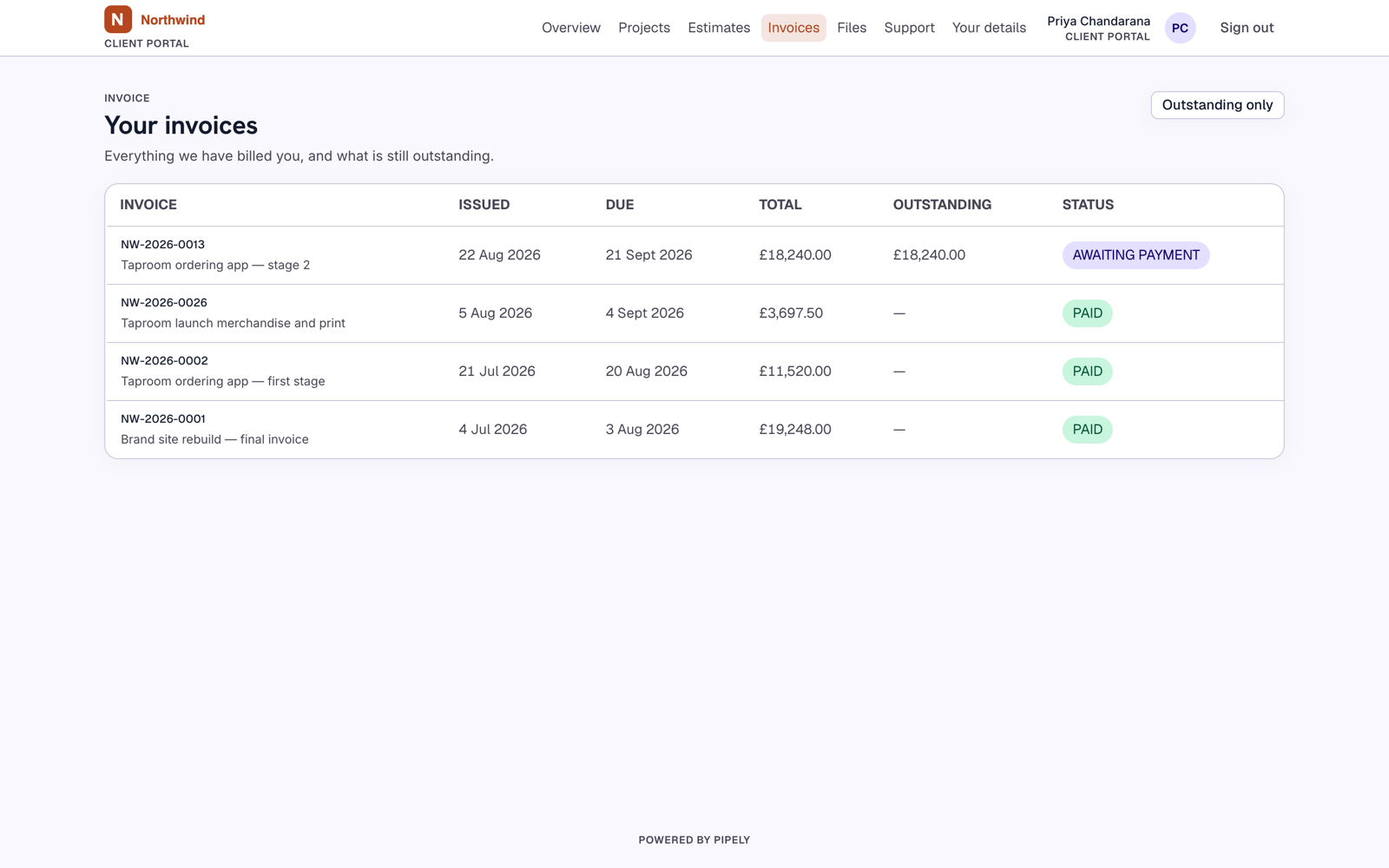
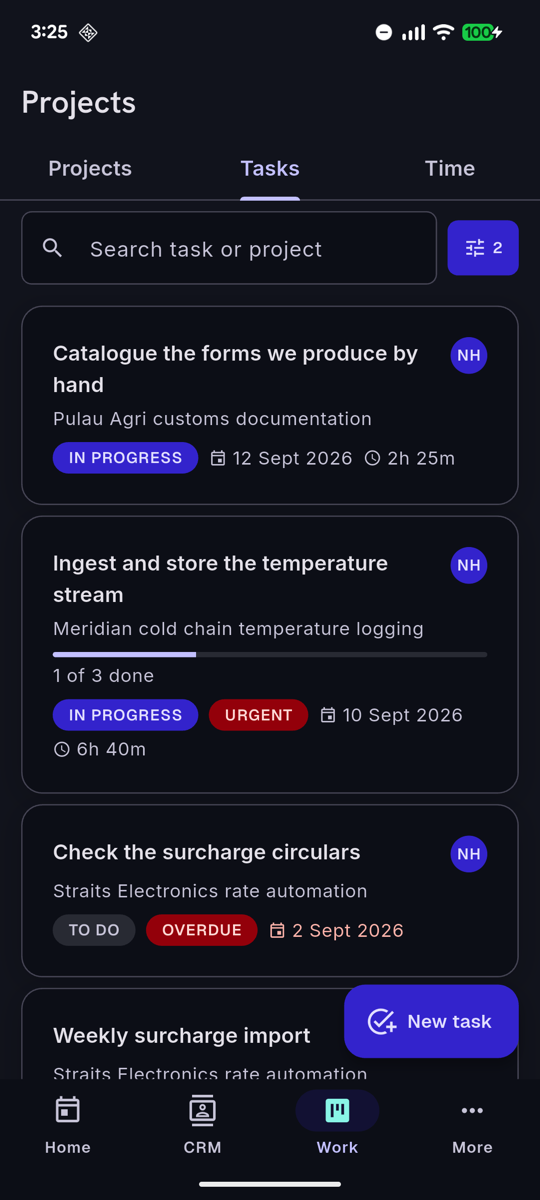
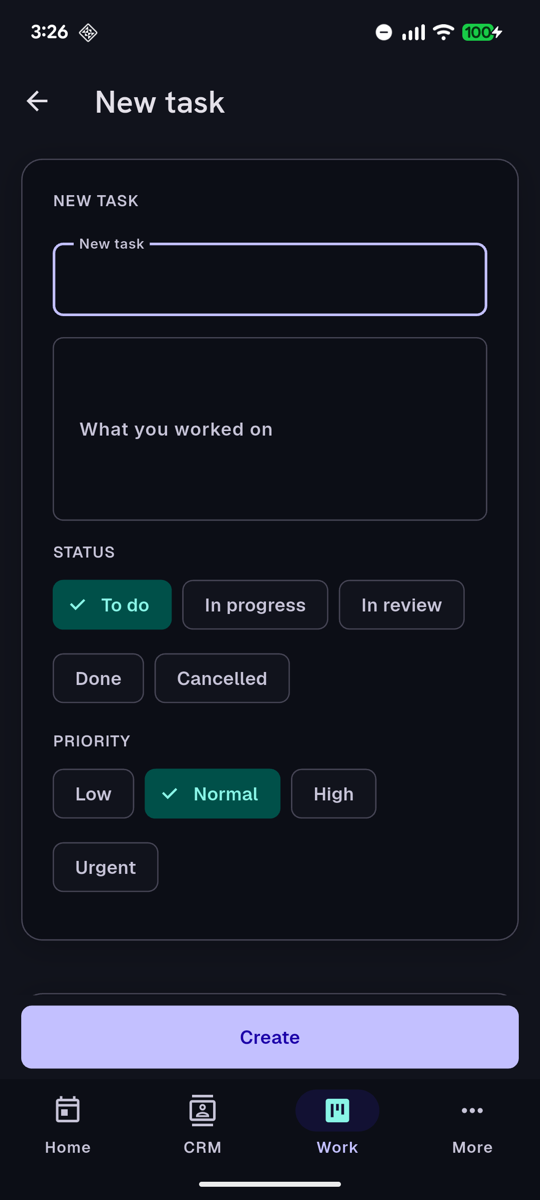
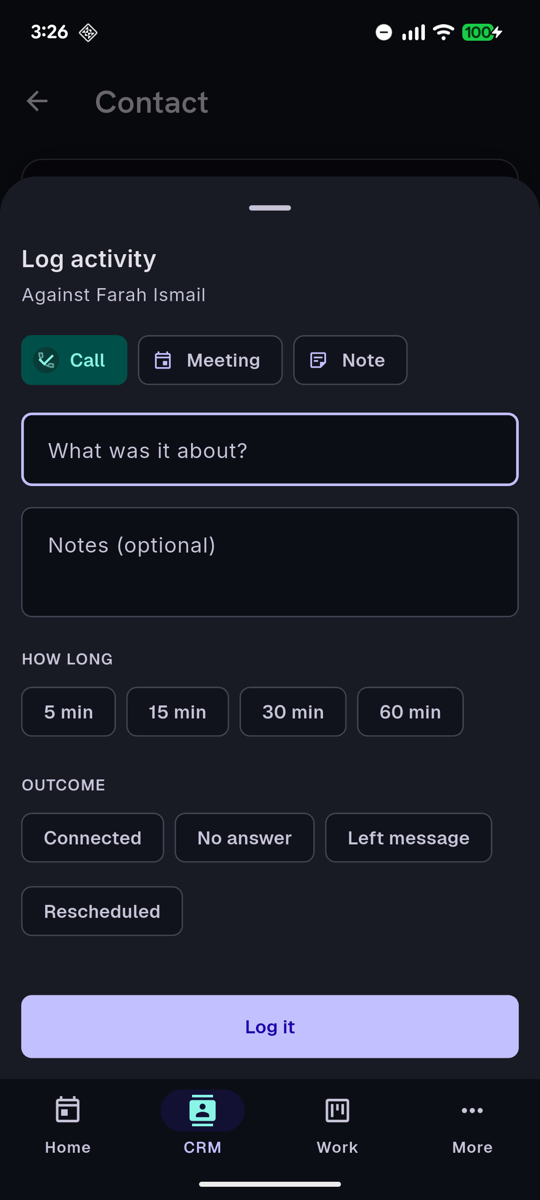
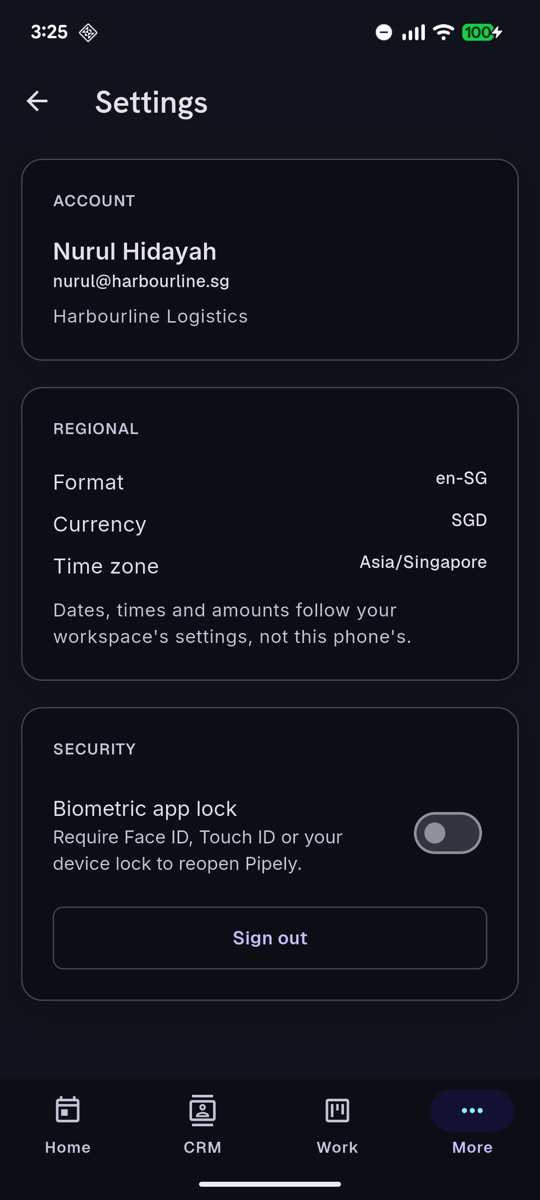
Every screen below is the running application against the demo workspace that pnpm db:seed builds — the same data you will have about ten minutes after cloning. Nothing here is a mockup or a render.
The staff web app
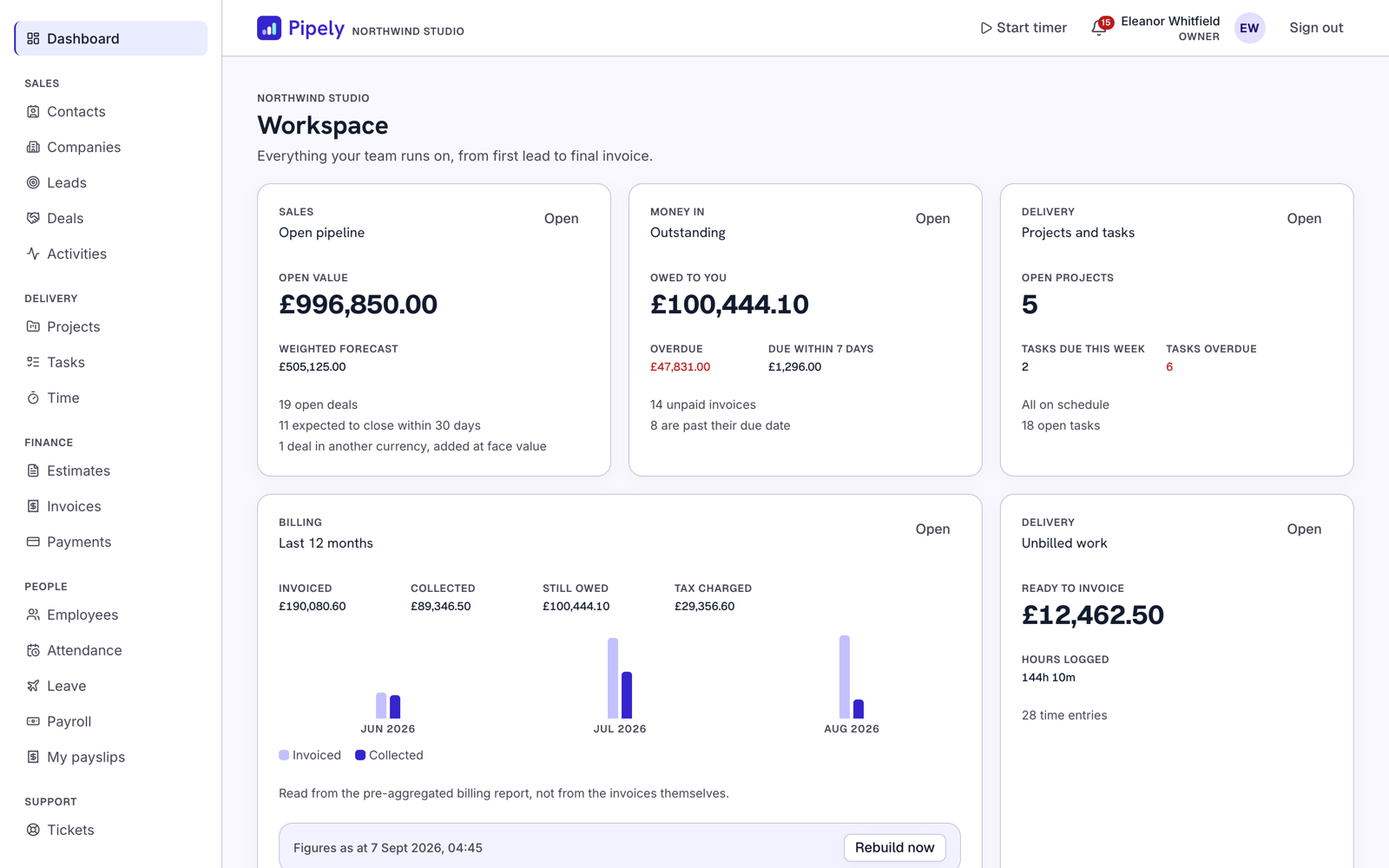
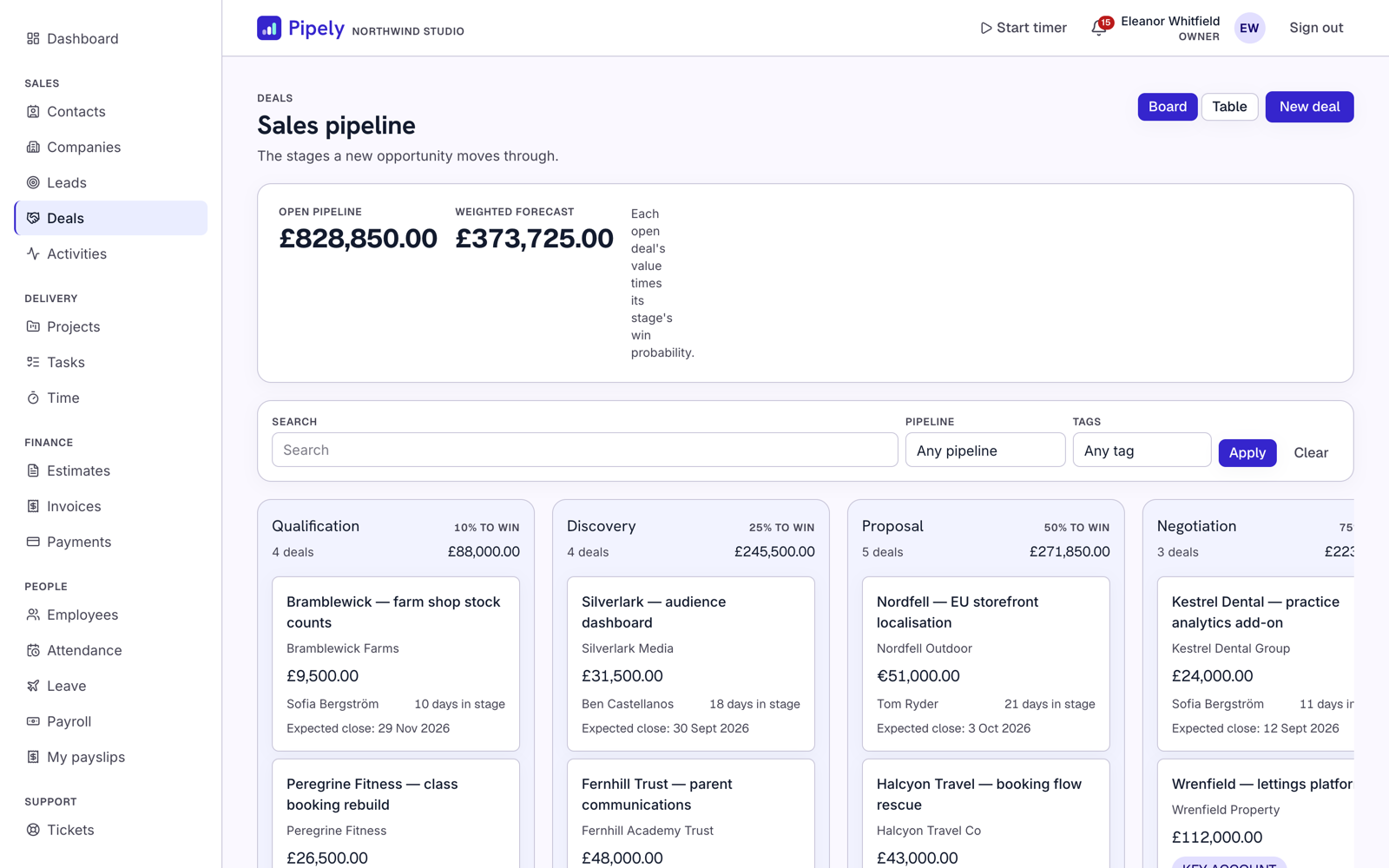
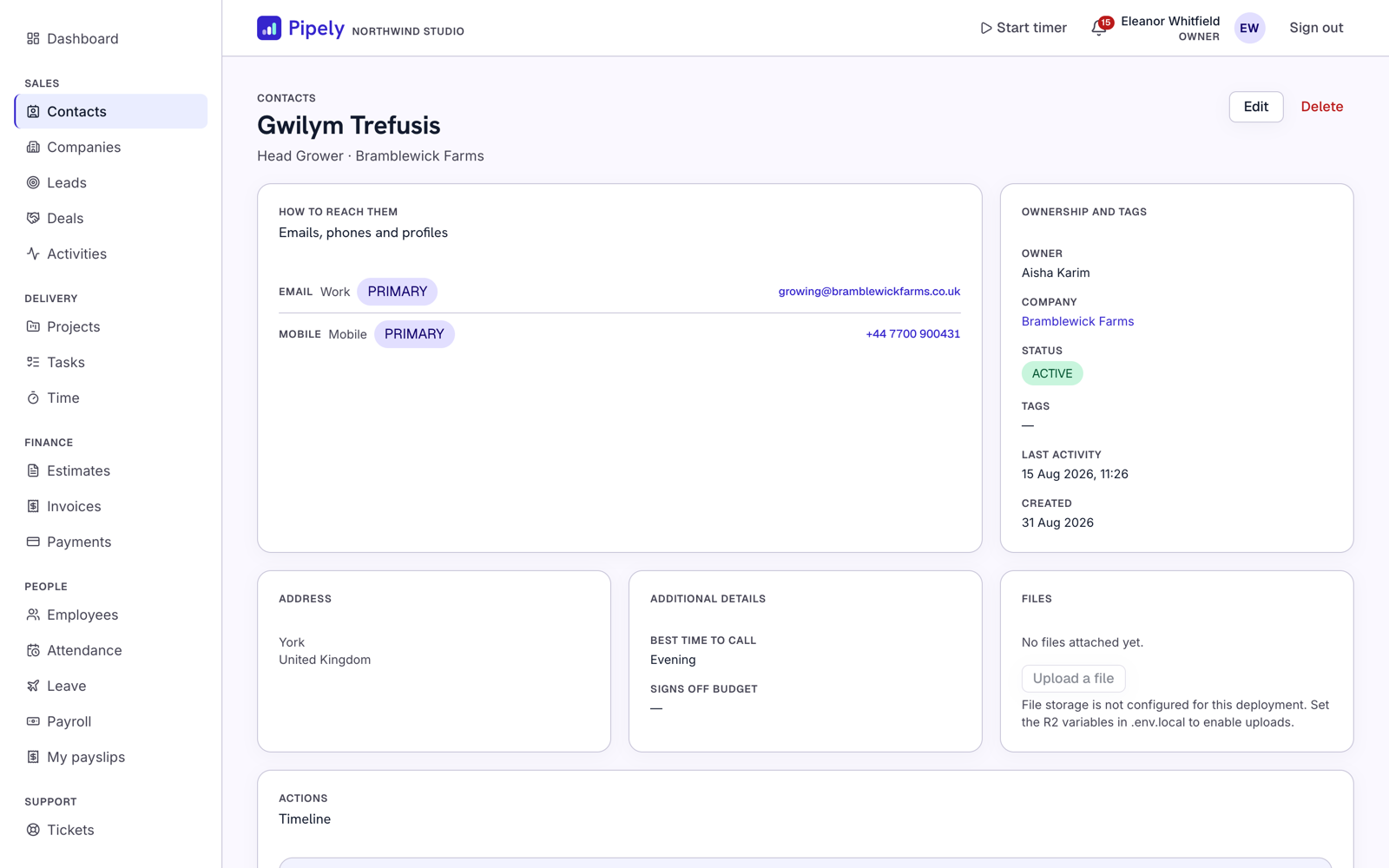
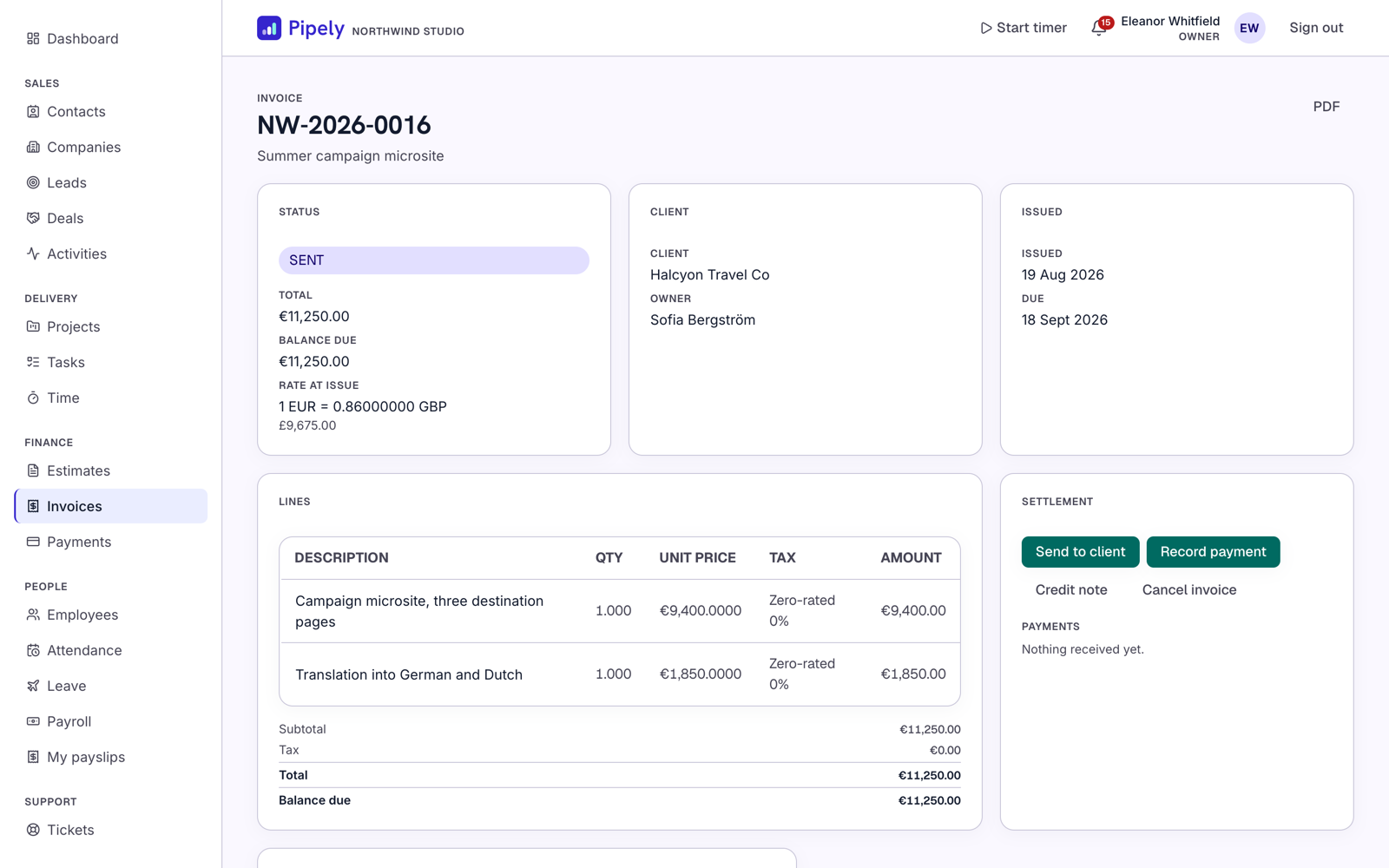
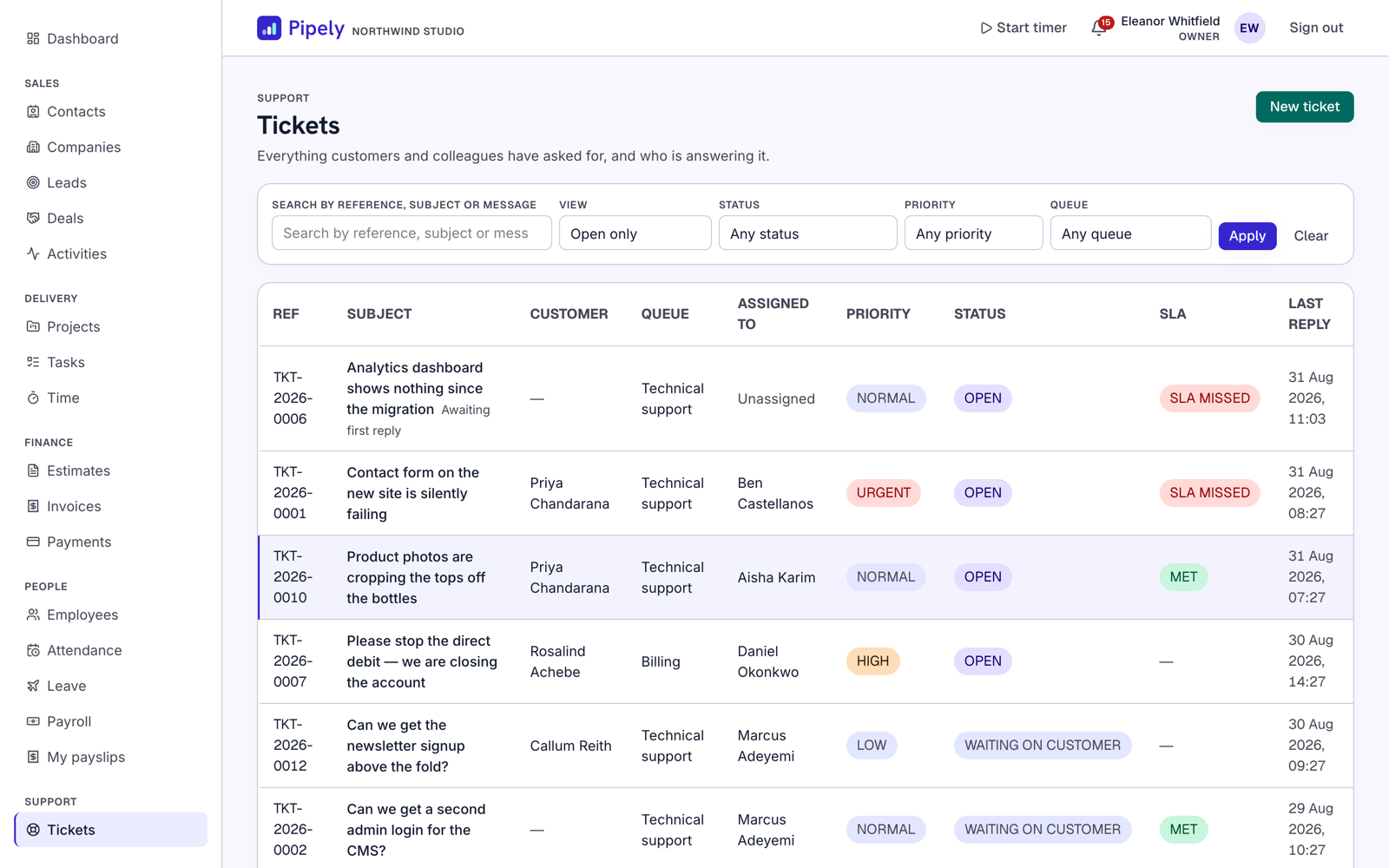
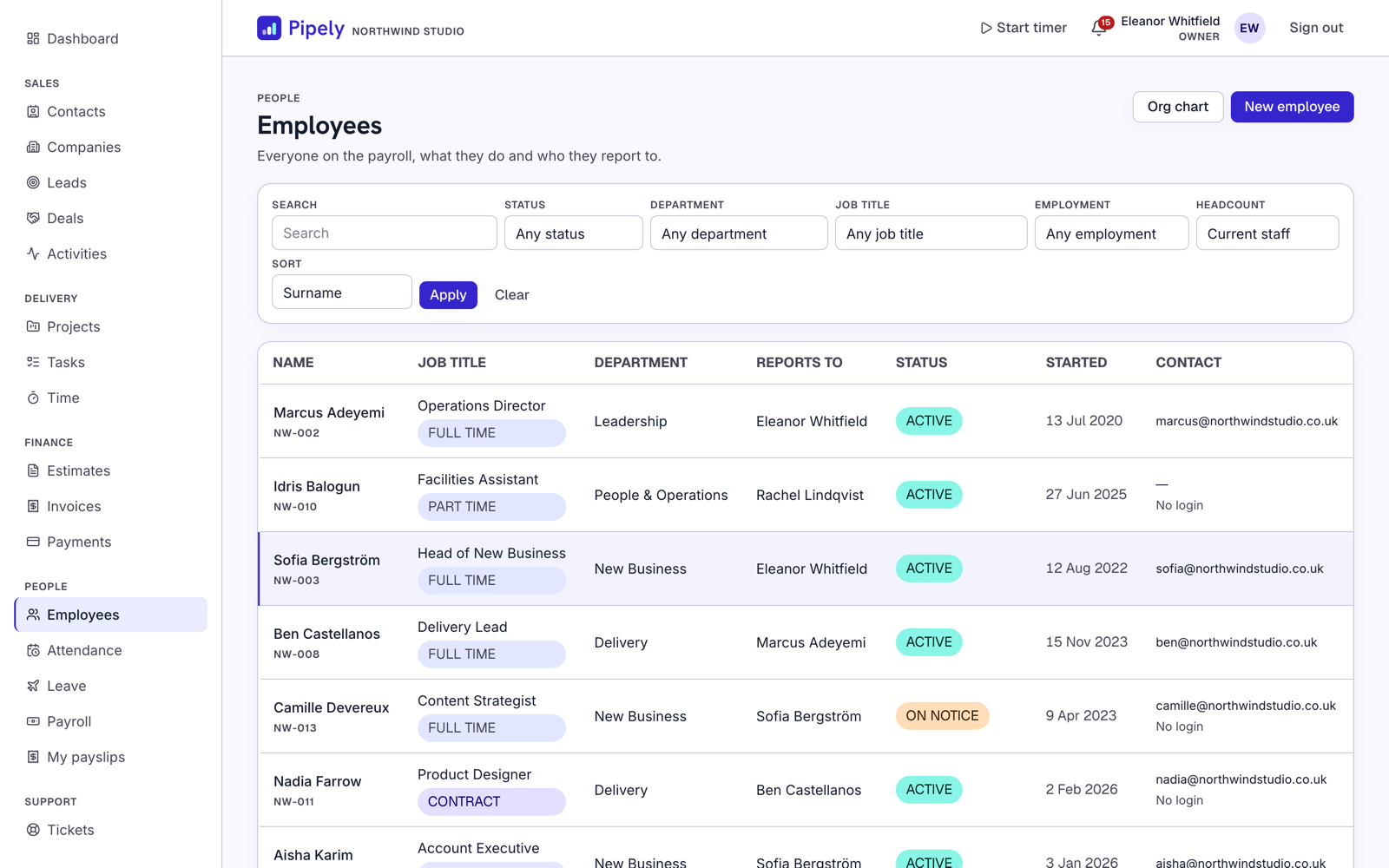
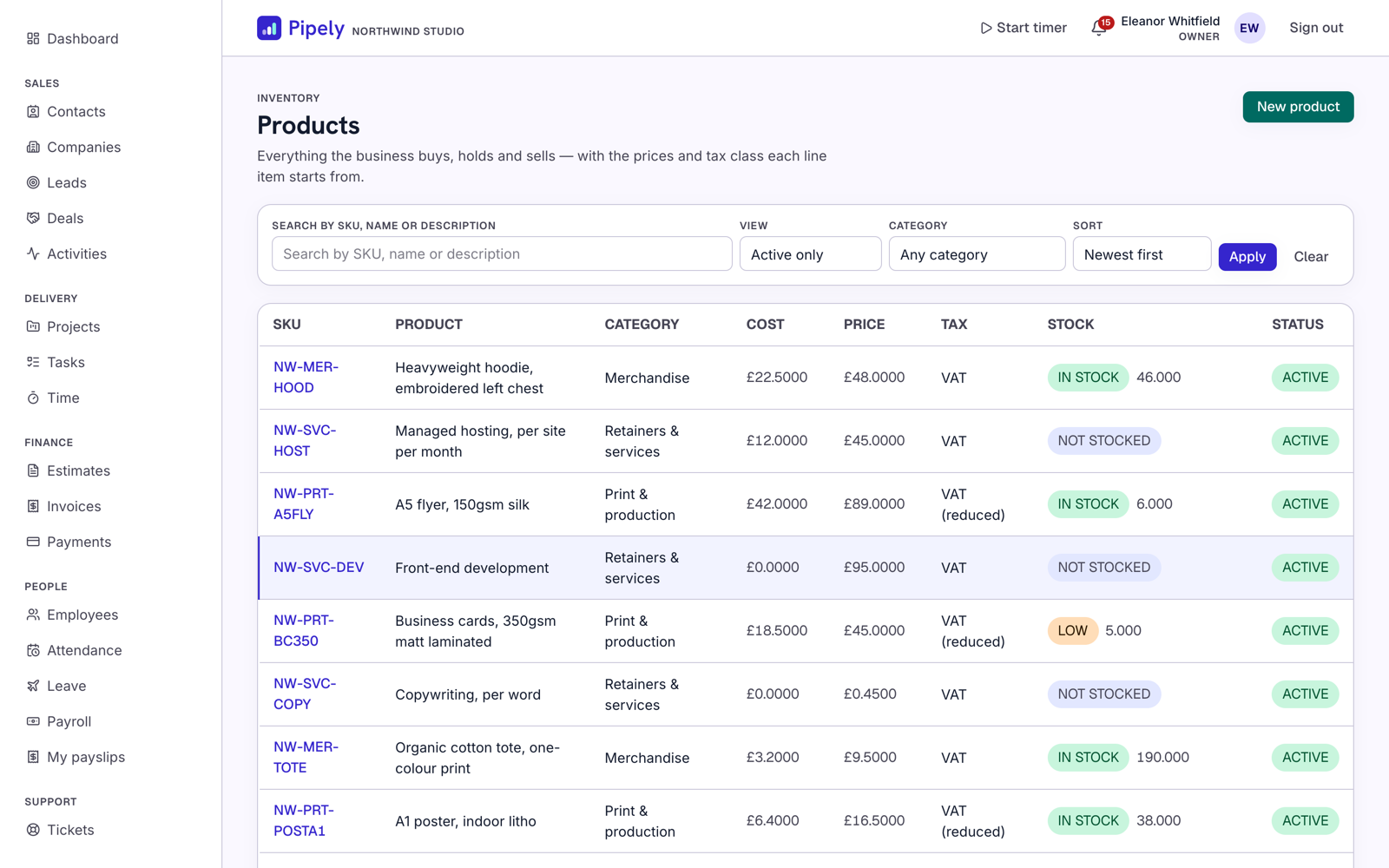
SUM over an immutable movement ledger, never a stored counter that can drift out of step with its own history — and it moves on its own when an invoice is paid.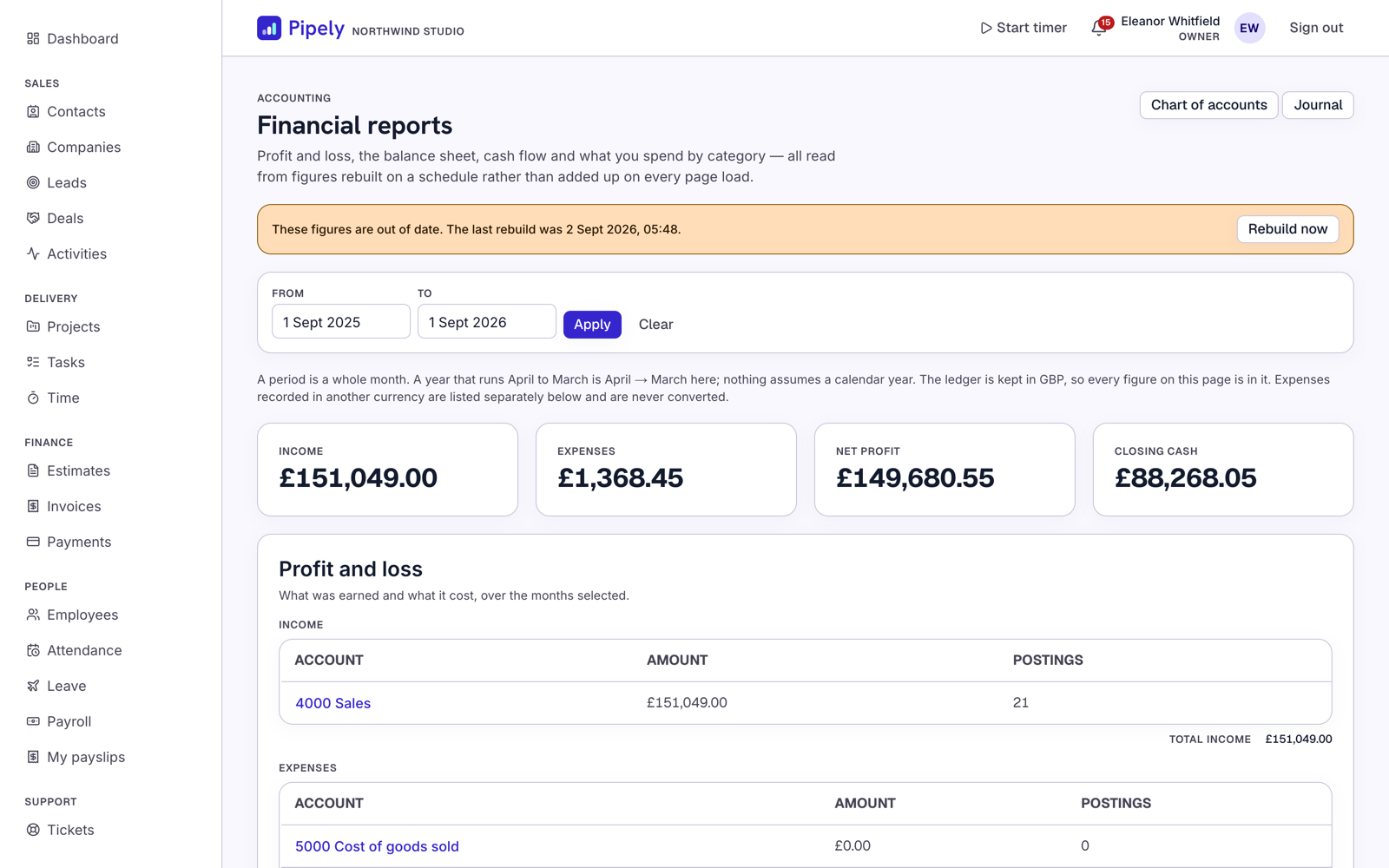
The client portal
The Flutter app
Android and iOS, against the same /api/v1 your own integrations would use. All seven modules are reachable and operable — it is not a viewer.
Overview
Pipely is a complete business-operations platform sold as source code. You install it once and either run it for your own company, or give each of your client companies an isolated workspace of their own and resell access.
One Next.js application serves three surfaces, routed by hostname. A Flutter app talks to the same backend through /api/v1.
Which surface a request gets is decided in apps/web/src/proxy.ts. A tenant can also be reached on its own domain once you point DNS at the app.
What makes it different
- A modern stack. Next.js App Router, React Server Components, TypeScript in strict mode with zero errors at build, Drizzle ORM, PostgreSQL. No jQuery, no Bootstrap, no
mysqli_query. - A modern deploy story. Push to Vercel, or
docker compose up -don your own box. No cPanel, no FTP. - Genuine multi-tenancy. Not a
company_idcolumn and good intentions — PostgreSQL row-level security, so a query that forgets its tenant predicate returns nothing rather than everything. - A real mobile app. All seven modules operable from the phone, with a deliberately narrow offline cache and sync queue.
What’s included
- Full source for every surface — the Next.js application (marketing site, staff app, client portal, and the
(platform)route group) and the Flutter app, in one pnpm workspace. - The database schema — 106 tenant-scoped tables plus platform and identity tables, with 51 SQL migrations in
apps/web/drizzle/, including every row-level security policy. - Demo seed data —
pnpm db:seedbuilds two complete workspaces with hand-written, realistic data across all seven modules. No lorem ipsum. - The design system — colour, type and radius tokens in
apps/web/src/app/globals.cssand a matching Flutter theme extension, consumed by every component. - The branding pipeline — one master SVG mark in
assets/brand/and a script that derives every launcher icon and favicon from it. - Test suites — unit tests plus a 2,018-test cross-tenant isolation suite that runs against a real database.
- Docker —
docker-compose.ymlandapps/web/Dockerfilefor a one-command self-host path. - 6 months of item support per the CodeCanyon standard.
Features
Seven modules, on web and mobile
Every module below is reachable and operable from both the staff web app and the Flutter app — not a viewer, and not a stub screen.
Cross-cutting systems
Built once and available to every module, rather than reimplemented per module:
- Custom fields — definable per entity type, validated server-side.
- Tagging — one tag vocabulary across modules.
- Audit log — every create, update and delete on a tenant entity writes a row with actor, timestamp, entity and a JSON diff. Secrets are redacted in the diff.
- File attachments — presigned direct upload to R2, magic-byte validation after the fact, signed expiring downloads, and a second permission layer so a caller cannot attach to or read files on a record they may not open.
- Notifications — in-app, with a subject/destination pair so a notification about a milestone opens the project that renders it.
- Comments — threaded, generic, permission-filtered per subject.
The client portal
Your customer signs in at /portal/login, sees their projects and files, accepts an estimate, pays the resulting invoice, downloads the receipt and raises a support ticket — all without a member of staff. White-labelled with the tenant’s colour and logo, with an optional “powered by” credit.
The portal never owns a second copy of a rule. A client accepting an estimate runs the same state machine a staff member does; paying runs the same payment-link function behind the staff “Payment link” button.
Security and access control
- Permissions are
module.actionstrings —deals.create,payroll.view_all— each grant carrying a scope ofown,teamorall. Scope filtering happens inside the same query wrapper as tenant filtering, so the two cannot drift apart. - Seven roles are seeded into every tenant — Owner, Administrator, Manager, Sales, Accountant, HR Manager, Employee — and tenants edit them freely.
- Auth.js v5 with credentials and Argon2id hashing, JWT sessions, and optional Google / Microsoft Entra OAuth.
- Two credential providers against two tables — staff (
users) and portal clients (portal_users) — because emails are unique per tenant, not globally. - Rate limiting on sign-in, signup, token refresh, the public web-to-lead endpoint and payment webhooks.
- Zod validation on every mutation, server-side, on both the server-action and the
/api/v1path — they share one guard, so validation is written once.
The API
/api/v1 route handlers serve the Flutter app and third-party integrations:
- Bearer + refresh auth. Opaque tokens stored as SHA-256, rotated on every refresh, one session row per device. A replayed refresh token revokes the whole family.
Idempotency-Keyon every mutation. Handled once in the shared route factory, so every endpoint inherits it. APOSTorPATCHcarrying the header executes at most once per tenant, actor, endpoint and key; a replay returns the original response withIdempotent-Replayed: true.GET /api/v1/meis the reference endpoint.
Architecture
Repository layout
pipely/
├─ apps/
│  ├─ web/                     Next.js — all four route groups
│  │  ├─ drizzle/              51 SQL migrations, including the RLS policies
│  │  ├─ eslint-rules/         Project-specific ESLint rules
│  │  ├─ messages/             Translation catalogue (English)
│  │  ├─ Dockerfile            Production image
│  │  └─ src/
│  │     ├─ app/               Route groups: (admin) (portal) (platform) (marketing)
│  │     ├─ auth/              Auth.js config, Argon2id, RBAC and can()
│  │     ├─ components/        UI components on the design tokens
│  │     ├─ db/                Drizzle schema, migrations runner and the seed
│  │     ├─ inngest/           Background job client, functions and cron dispatchers
│  │     ├─ lib/tenancy/       tenantDb(), scope filtering, audit, host resolution
│  │     ├─ lib/validation/    The shared Zod + permission guard
│  │     ├─ server/            One folder per module: the operations
│  │     └─ proxy.ts           Host → surface routing and tenant resolution
│  └─ mobile/                  Flutter app — Riverpod, GoRouter, Drift, Dio
├─ assets/brand/               The master SVG mark
├─ docker-compose.yml
└─ .env.example
Stack
strict: trueTenant isolation — three layers, and a fourth in the portal
Every tenant-owned table carries a non-nullable tenant_id. There are 106 of them, and three independent mechanisms keep one tenant’s data away from another’s:
- 01
The query wrapper.
All tenant reads and writes go throughtenantDb(tenantId), which adds the tenant predicate, applies the caller’s permission scope and writes the audit row. Importing the raw database client outside a short declared allowlist failspnpm lint— the rule is inapps/web/eslint-rules/no-raw-db.js. - 02
Row-level security.
Every tenant table has a PostgreSQL policy keyed to a session variable the wrapper sets per transaction. If a query somehow bypasses layer 1, the database still returns nothing. - 03
The session.
tenantIdand the user’s role come from the authenticated session, never from a URL segment or request body. Changing an id in a URL cannot reach another tenant, because the id in the URL is never trusted.
The client portal adds a fourth layer, because two customers of one tenant also need isolating from each other: portalDb(audience) narrows every read to the signed-in client’s own company, and a record the tenant withheld — an internal task, a private file, an internal comment — stays hidden.
Design invariants
These hold throughout the codebase. Keeping them is what makes a change safe:
- Every tenant query goes through
tenantDb(); rawdbis lint-enforced to a small allowlist. - Every mutation validates with Zod, server-side, before it touches the database.
- Every create, update and delete on a tenant entity writes an audit row.
- Cursor pagination on every list view — no offset, no unbounded select.
- A composite
(tenant_id, <filter column>)index for every filterable column. - Reports read pre-aggregated tables refreshed on a schedule, and every report screen states when it was last built.
- No hardcoded user-facing strings — they live in the translation catalogue on both clients.
- No secret in any client bundle or APK.
- Currency and date formatting follow the tenant’s configured locale and timezone, not the device’s or the server’s.
Setup and deployment
Requirements
corepack enable installs itOption 1 — local development
pnpm install

cp .env.example .env
# Set AUTH_SECRET (openssl rand -base64 48) and DATABASE_URL.

pnpm db:migrate     # create the schema and the RLS policies
pnpm db:seed        # two demo tenants with realistic data
pnpm dev
Then open:
http://pipely.localhost:3000— marketing sitehttp://northwind.pipely.localhost:3000— a tenant’s staff apphttp://northwind.pipely.localhost:3000/portal— that tenant’s client portal
*.localhost to 127.0.0.1, so there is nothing to add to /etc/hosts. The seed prints every account it created and their shared password.The two demo tenants are deliberately different. Northwind is on the Scale plan with every module switched on; Harbourline is on Starter with three. That is not decoration — it is how you see the plan gate actually gating, because a module a plan excludes disappears from navigation rather than showing a locked screen.
Option 2 — Docker
cp .env.example .env
# Set AUTH_SECRET, and APP_APEX_DOMAIN to your real domain.

docker compose up -d
PostgreSQL and the web app come up together. Apply migrations as described at the bottom of docker-compose.yml.
APP_APEX_DOMAIN is baked at build time. It is read by next.config.ts to build serverActions.allowedOrigins, which Next serialises into the build output. Setting it afterwards does not change it.
Build without it and the image trusts pipely.localhost; every page then renders on your real domain and every form fails as a cross-origin request — which looks like anything except a missing variable. Set it before pnpm build, pass it to docker build with --build-arg APP_APEX_DOMAIN=... (docker-compose.yml already does), and rebuild rather than restart when you change your domain.
Option 3 — Vercel
Pipely runs on Vercel with no code changes.
- 01Import the repository and set Root Directory to
apps/web. This is a pnpm workspace — the app is not at the repository root and Vercel needs telling. Framework, package manager and Node version all detect correctly from there. - 02Add a wildcard domain. Add both
yourdomain.comand*.yourdomain.comin the project’s Domains tab. A wildcard certificate is issued for you, but only if Vercel is running the DNS. Without the wildcard, no tenant is reachable — every workspace is a subdomain and the app decides which surface you get from theHostheader. - 03Set the environment variables from Integrations matrix.
APP_APEX_DOMAINmust be set before the first build, per the warning above. - 04Run migrations from your machine, not from the build — see Database setup.
- 05Create an Inngest app pointed at
https://<your-host>/api/inngestand set its two keys. See Scheduled jobs.
apps/web/vercel.json sets two things deliberately. fluid declares Fluid compute, which gives every function a 300-second default duration — what /api/inngest needs when a report rebuild runs — and lets one instance serve concurrent requests, which is what makes a module-scoped connection pool sensible. regions pins functions to iad1; change it to the region your database is in, because every request talks to Postgres several times.
Build commands
tsc --noEmit, strict modeDatabase setup
- 01
Provision
Any PostgreSQL 15 or newer. On Neon, create a project and use the pooled connection string — the host contains-pooler. Self-hosting,docker-compose.ymlbrings up a Postgres service and sets the URL for you. - 02
Set the connection
.envDATABASE_URL=postgresql://user:password@host:5432/pipely DATABASE_POOL_MAX=10 - 03
Migrate
terminalpnpm db:migrateThis applies all 51 migrations in order, creating the schema, the row-level security policies and the
pipely_approle. - 04
Seed (optional)
terminalpnpm db:seedCreates the permission catalogue, the plans, two complete demo tenants with data across all seven modules, their staff and portal logins, and a super-admin. Every account gets the password in
SEED_PASSWORD(default123456).Never point the seed at a production database. For a real deployment, skip this step and use the signup flow on the apex domain to provision your first tenant, which creates the tenant, its seven default roles with grants, the owner account and the first audit row in one transaction.
The two database roles — the step most often skipped
Pipely expects two connection strings:
DATABASE_URL_OWNER unset still deploys, still works, and silently turns row-level security off — because the app then connects as the owner, and PostgreSQL exempts a table’s owner from its policies. Your only remaining isolation is the query wrapper. That is fine locally and not fine in production.The migration creates pipely_app as NOLOGIN on purpose — a migration must never create a reachable account with a guessable secret — so you have to enable it deliberately:
ALTER ROLE pipely_app WITH LOGIN PASSWORD '<a long random string>';Then put pipely_app in DATABASE_URL and the owner in DATABASE_URL_OWNER. pnpm test:isolation reports which of the two postures you are running, on every run.
Integrations matrix
Two variables are required. Everything else has a working default or disables one feature until configured — the application starts either way.
Required
DATABASE_URLRequiredAUTH_SECRETRequiredopenssl rand -base64 48. Changing it signs everyone outAPP_APEX_DOMAINProductionAPP_PLATFORM_HOSTProductionOptional — and what each unlocks
downloadUrl is null. Nothing throws on a read; an upload is refused with a message naming the four variablesThird-party services and their costs
Pipely is source code, not a hosted service. Your purchase buys the code and item support. It does not include hosting, a database, any third-party account, or any credit or balance with the providers below.
Every service Pipely can talk to is operated by a third party and billed to you by that third party, under their pricing and their terms. None of it is paid to us, and none of these prices are ours to set, hold or guarantee — any of them can change at any time. Check each provider’s current pricing and terms yourself before you rely on it. The figures below are indicative only and were correct at the time of writing.
What this means in practice
- You can run the whole product on a database and nothing else. Every optional integration above is unset by default, and the feature it powers switches itself off with a message rather than erroring. Integrations matrix says exactly what each one does when it is not configured.
- Nothing signs you up for anything. There is no bundled account, no telemetry endpoint and no phone-home. Email is plain SMTP so you can point it at whatever you already have.
- Stripe’s fee is charged to you, not to us, and it is per transaction. If you are reselling workspaces, model that fee before you set your own prices.
- If you resell access to your customers, the costs above are yours to carry and to price into whatever you charge them. Envato’s Extended License is the one that covers charging your end users.
Payments
Stripe is implemented behind a gateway abstraction. Credentials are per tenant and are not environment variables — each workspace configures its own Stripe account in the app, so a reseller’s clients each take their own money.
To configure a tenant’s gateway
- 01Set
ENCRYPTION_KEYfirst. Gateway secrets are stored encrypted at rest, and without the key the save is refused rather than stored in the clear. - 02Sign in to the tenant’s staff app as an owner or administrator, and open payment settings.
- 03Enter the Stripe secret key, publishable key and webhook signing secret, and set whether the configuration is live or test mode.
- 04In the Stripe dashboard, add a webhook endpoint pointed at the URL the settings screen shows you. Each tenant gets its own opaque webhook key in the path, so one tenant’s deliveries can never settle another’s invoice.
What the webhook layer guarantees
- Signature verification against the tenant’s own signing secret. A tampered body, an unsigned delivery, a wrong secret or a replayed captured delivery are all rejected.
- Replay safety. Deliveries are claimed by
(tenant, provider, event id), so one event delivered twice produces one payment and one receipt. - Mode matching. A test-mode event is ignored by a live-mode configuration.
- Currency matching. A payment in the wrong currency is refused and recorded as failed rather than silently accepted.
- Overpayment and partial payment are both recorded accurately; refunds reopen the balance and never refund twice on redelivery.
When an invoice settles, one function fans out the consequences: the receipt email is queued, stock is decremented for any product lines, and the journal entry is posted. Any new settlement path must end with that same call rather than reimplementing the steps.
payment_gateways and an implementation of the gateway interface — but the implementations do not.Files and media
Attachments use Cloudflare R2, which speaks the S3 API. Set the four variables from Integrations matrix and the feature switches itself on.
How an upload works
- 01The client asks the server for a presigned
PUTURL. The server checks the caller’s permission and their permission on the record being attached to, then mints a URL undertenants/{tenantId}/. - 02The browser or the app uploads directly to R2. Bytes never pass through your application server, so there is no request-body limit and no per-second billing meter on the transfer.
- 03The server then validates the stored object by magic bytes, not file extension, and quarantines anything whose real type does not match what was declared.
- 04Downloads are freshly signed, short-lived URLs minted only after a server-side permission check. Nothing is ever public and there is no permanent URL.
The second permission layer
A caller holding file permissions at the widest scope still cannot list, download or delete a file hanging off a record they may not open, and cannot attach one to it either. Each attachable module registers its table, the permission that governs reading it, and the column its scopes filter on. A module that is not registered is refused by construction — its attachment panel renders empty rather than the boundary silently not being there.
Cost: R2 has no egress fees; storage is roughly $0.015/GB/month.
Outbound
Plain SMTP via nodemailer. The SMTP_* variables are the platform defaults, used for signup, password reset and platform notices. Each tenant can configure its own SMTP in company settings for its own outbound mail; the tenant’s setting takes precedence and the platform values are the fallback.
Everything sent goes through one outbox queue, so a delivery failure is retried rather than lost, and every module’s mail takes the same path.
Inbound — email to ticket
Configured per tenant in the app, not in environment variables. IMAP polling by default, with a documented adapter interface if you would rather use a webhook provider. A shared platform inbox is deliberately not offered — it would file one tenant’s customer replies against another tenant’s contacts.
Routing: a ticket reference in the subject line finds its ticket; failing that, In-Reply-To finds one. A reference the tenant has no ticket for — an invoice number a customer forwarded — opens a new ticket rather than reaching for a near match. Messages are de-duplicated, machine-generated mail is filed but never acknowledged, and a reference quoting another tenant’s ticket number opens a ticket in the mailbox’s own tenant and puts nothing on the other tenant’s thread.
ENCRYPTION_KEY. Without it the save is refused — the product never stores a credential in the clear.Scheduled jobs
The schedule lives in Inngest, not in this application. Inngest calls the app on a cron, not the other way round. Without a connected Inngest app, nothing scheduled runs by itself: no recurring invoices raised, no overdue chasing, no inbound mail polled, no SLA breach notified, no report pre-aggregate rebuilt.
Nothing breaks and no figure is wrong. Every screen that depends on one of those jobs has a manual button (“run due schedules”, “rebuild now”, “check for breaches now”), every report states when it was last built, and support-desk SLA state is computed on read so it is correct with nothing running at all. But an unattended install without Inngest is an install where nobody chases an invoice.
In development
No account and no keys. Run this in a second terminal and it discovers the app on its own:
npx inngest-cli@latest devIn production
- 01Create an Inngest app pointed at
https://<your-host>/api/inngest. - 02Set
INNGEST_EVENT_KEY(dashboard → Manage → Event Keys) andINNGEST_SIGNING_KEY(dashboard → Manage → Signing Key, which authenticates Inngest’s calls in). - 03Redeploy, then confirm the app shows your functions as synced.
The four cadences
Four cron dispatchers wake up, list the workspaces that are not suspended, and send one event per workspace per job — so a slow or broken workspace never holds up another.
Standard five-field cron, in UTC. Inngest also accepts a TZ= prefix, which is what to use for anything a person notices the time of:
INNGEST_CRON_DAILY=TZ=Europe/London 30 6 * * *A malformed value is refused at boot with a message naming the variable — it does not silently fall back, because a schedule that ignores its own configuration is worse than one that never started.
Cost
Inngest’s free tier covers 50,000 steps per month. The default cadences fan out roughly 606 events per tenant per day (about 18,500 a month), and each event is one to two steps — so the free tier comfortably covers one workspace and is tight for two. Slowing the five-minute dispatcher is the first thing to reach for; it is the single biggest cost line. .env.example carries the arithmetic.
Push notifications
What is built:
- The Flutter app integrates
firebase_messaging, requests permission, obtains a device token and handles an incoming message, including resolving a deep link to the right screen. - The API accepts and stores device tokens —
POSTandDELETE /api/v1/devices/push-tokens— in a tenant-scoped table. - In-app notifications work fully on both clients: they are created, listed, marked read and cleared, and they carry a subject/destination pair so a notification opens the screen that actually renders its subject.
What is not built: the server-side dispatcher. FCM_SERVICE_ACCOUNT_JSON is declared and validated in apps/web/src/env.ts, but no code consumes it — nothing calls the FCM API, so no push message is ever delivered, whether the variable is set or not.
To finish it you would add a sender that reads the service account, mints a Google OAuth token, and posts to the FCM v1 endpoint for each stored device token — then call it from the notification creation path alongside the in-app row. The tokens, the tenant scoping and the deep-link payload shape are already in place.
Neither google-services.json nor GoogleService-Info.plist ships in the package, deliberately — they are your Firebase project’s files. Add them under apps/mobile/android/app/ and apps/mobile/ios/Runner/ respectively.
The Flutter app
minSdkcompileSdkPointing it at your backend
The only thing the app needs to be told is where its own backend is. No third-party key lives in the app — Stripe, R2, SMTP and FCM credentials are all server-side, because anything in an APK can be extracted with strings.
cd apps/mobile
flutter pub get

# Copy the template and set your origin.
cp dart_define.example.json dart_define.json

flutter run --dart-define-from-file=dart_define.json
PIPELY_API_BASE_URL is the origin of the Next.js app — no trailing slash and no /api/v1 suffix, which the app appends itself.
It must be a tenant host, never the apex. https://acme.pipely.app is right; https://pipely.app is not, and sign-in will be refused outright.
The tenant is the hostname. There is no workspace field on the sign-in screen and there will not be one: the server resolves the tenant from the Host header and from nothing else. A tenant field would hand an attacker a single endpoint from which to spray credentials at every workspace on the deployment, and would make account enumeration across tenants one request. A picker on the client would be that same endpoint wearing a dropdown.
What that costs. PIPELY_API_BASE_URL is compile-time, so one build talks to exactly one workspace. That is right for a company running Pipely for itself. A buyer reselling to many client companies needs a build per customer until a runtime workspace step exists — their staff can use the web app, which has no such constraint, in the meantime.
http://10.0.2.2:3000 on Android (the emulator’s route to the host loopback) and http://localhost:3000 elsewhere, so a fresh clone runs with no arguments. A release build throws at startup if the variable is missing, and refuses a plaintext http:// origin — shipping a release pointed at a developer’s laptop is worse than failing to start.Offline scope — deliberately narrow
Drift caches reads for contacts, deals, tasks and today’s schedule. The write queue covers exactly attendance clock-in, task status, time entries and activity logging.
Invoices, stock levels and the ledger are online-only, on purpose. A stock level or a ledger balance cached on a phone is a wrong number waiting to be read, so those screens refuse rather than showing something stale — and say so.
Commands
flutter analyze                      # static analysis — must be clean
flutter test                         # unit and widget tests
dart run build_runner build          # after changing a model
flutter gen-l10n                     # after adding an ARB string

flutter build apk --release --dart-define-from-file=dart_define.json
flutter build appbundle --release --dart-define-from-file=dart_define.json
flutter build ipa --release --dart-define-from-file=dart_define.json
Both platform builds are supported. The Android debug build is the one exercised most during development, so budget the usual signing and provisioning time for your first iOS build.
Branding and customisation
The mark
assets/brand/pipely-mark.svg is the master mark and the single source for every icon in the product — the web favicon, the PWA icons, the Android and iOS launcher icons and the in-app logo on both clients. pipely-mark-mono.svg is the same geometry filled with currentColor for single-colour contexts.
To rebrand:
- 01Replace
assets/brand/pipely-mark.svgwith your own mark, keeping the corner radius proportional (14 on a 64 viewBox, about 22%) so it sits correctly beside an iOS squircle and inside an Android adaptive-icon mask. - 02Keep the bars inside the Android safe zone — the mask can clip to a circle of 66% of the canvas, so a straight export gets the ends clipped.
- 03Regenerate every raster:
node tool/generate_app_icons.mjsfromapps/mobile. Output is committed, so a buyer who clones gets a branded app without running anything. - 04Replace
apps/web/src/app/icon.svg,favicon.icoandapple-icon.png.
The wordmark beside the mark is live text in Hanken Grotesk — never re-typeset it as an image, or it stops being selectable and translatable.
Theme tokens
Colour, type and radius live as tokens in apps/web/src/app/globals.css and a matching Flutter theme extension. Components consume the tokens; there are no ad-hoc hex values or inline text styles to hunt down. Change a token and both clients follow.
Typography: Hanken Grotesk for headlines with tight tracking at large sizes, Inter for body, and Geist for labels, metadata and numeric table data. Radii are 0.5rem for standard UI, 1rem for bento cards, and fully rounded for status pills.
Per-tenant white label
Each tenant sets its own primary colour and logo, which the client portal renders — so your customer’s customer sees your customer’s brand. The “powered by” credit is a per-tenant toggle.
Adding a module or a field
- Navigation is declarative. Add a module to
apps/web/src/lib/navigation/admin-nav.tsand nowhere else; it is filtered server-side by permission and by the tenant’s plan. - A new tenant table needs three things: a non-nullable
tenant_idcolumn, an entry inTENANT_TABLESinapps/web/src/db/schema/index.ts, and an RLS policy in a new migration. Miss one and the isolation suite fails naming the table. - Custom fields need no code. They are a cross-cutting system, definable per entity type from the settings UI.
- Migrations are additive. Generate with
pnpm db:generate; never edit a migration that has been applied.
Localisation
The UI is English only in v1, but no user-facing string is hardcoded. Web strings live in apps/web/messages/en.json (next-intl); mobile strings live in apps/mobile/lib/l10n/app_en.arb. Adding a language is a translation file plus a locale registration, not a refactor. Run flutter gen-l10n after editing the ARB.
Right-to-left layouts have not been exercised. Currency and date formatting are already locale-aware and follow the tenant’s configured locale and timezone rather than the device’s or the server’s.
Production checklist
- 01Set
DATABASE_URL_OWNER. Enable thepipely_approle withALTER ROLE pipely_app WITH LOGIN PASSWORD '…', put it inDATABASE_URL, and the owner inDATABASE_URL_OWNER. Without this, row-level security is off. Verify withpnpm test:isolation, which reports the posture on every run. - 02Generate a fresh
AUTH_SECRET—openssl rand -base64 48. Never reuse the development value. - 03Set
ENCRYPTION_KEY—openssl rand -base64 32. Required before any tenant can save SMTP, IMAP or payment gateway credentials. Treat it likeAUTH_SECRET: changing it makes every already-stored secret unreadable. - 04Set
APP_APEX_DOMAINandAPP_PLATFORM_HOSTbefore the build, and rebuild after any change. SetAPP_PROTOCOL=https. - 05Point a wildcard DNS record at the app —
*.yourdomain.com— or no tenant is reachable. - 06Apply migrations deliberately with
pnpm db:migrate, from your machine or a one-off job. Not from a build step. - 07Do not run
pnpm db:seedagainst production. Provision your first tenant through signup on the apex domain. - 08Connect Inngest and set both keys, or accept that nothing recurring runs. Confirm the functions show as synced.
- 09Configure R2 if you want file attachments, and keep
R2_SIGNED_URL_TTL_SECONDSshort. - 10Configure SMTP — at minimum the platform defaults, so password reset works.
- 11Configure each tenant’s Stripe keys in-app and register the per-tenant webhook endpoint in the Stripe dashboard. Confirm live/test mode matches.
- 12Change every seeded password if you seeded anything, and delete demo tenants you do not want.
- 13Run the gates:
pnpm test:cimust pass,pnpm buildmust exit clean, andflutter analyzemust report no issues. - 14Set
DATABASE_POOL_MAXto suit your platform — lower it on serverless, where many instances share one database. - 15Review
TENANT_CACHE_TTL_SECONDS. Raising it cuts database reads; lowering it makes a newly provisioned tenant resolve sooner.
Known limitations
Named here rather than discovered later. These are deliberate scope decisions or honest gaps, not a roadmap with dates.
Not built
- No SaaS billing layer. Plans exist and gate which modules a tenant sees, and signup provisions a real tenant — but there is no subscription lifecycle: no trial expiry, no dunning, no seat or storage enforcement. If you intend to resell subscriptions, you are building that part.
- The super-admin console is one page. The
(platform)route group, the schema and the host routing are in place; the screens are not. - There are no staff or role management screens. The permission system itself is complete and enforced —
module.actiongrants, three scopes, seven seeded roles, checked server-side on every action and route — but/settings/staffand/settings/rolesdo not exist and appear in the sidebar as disabled Soon rows. The only staff account a workspace gets is the owner created at signup; adding a colleague, changing somebody’s role, or editing a role’s grants is a database operation today. If you are running this for more than one person, this is the first screen you will want to build, and the model underneath it is already there. - One payment gateway. Stripe, behind an abstraction. PayPal, Paddle, Razorpay and Mollie are not implemented.
- TOTP two-factor authentication is schema only. The
totp_secretandtotp_enabled_atcolumns exist on both the staff and super-admin tables, and the audit log already redacts the secret — but there is no enrolment, no verification and no TOTP library in the dependency tree. Do not advertise 2FA to your users until you build it. - Server-side push is not implemented. Device tokens are registered and stored and the app handles an incoming message, but nothing dispatches one. See Push notifications.
- No guided web installer. Install is the documented command sequence, or Docker.
- Per-tenant API keys are not built.
/api/v1authenticates with bearer tokens issued to a user session; there is no separate machine credential. - The mobile app is one build per workspace. The backend URL is compile-time and must be a tenant host, because the tenant is resolved from the
Hostheader — a deliberate security decision, explained in The Flutter app. A reseller with many client companies needs a build per customer until a runtime workspace step exists.
Deliberately out of scope, and staying that way
- Statutory payroll tax calculation for any jurisdiction. This is a payroll engine: you define the earnings and deduction components. It will not file your returns or calculate your PAYE.
- Accounting compliance. The accounting module exists to make the other six modules add up, not to replace an accounting package. No period lock, no closing run, no multi-currency journal, and no cost of goods sold.
- Multi-language UI in v1. English ships; the catalogues are ready for more.
- Offline editing on mobile beyond the four cached reads and four queued write types. Extending the queue to invoices or stock is a correctness problem, not a feature.
Mobile gaps, specifically
All seven modules are operable from the phone and no placeholder screen remains. These four narrower gaps are real and worth knowing:
- Expense rebilling has no dedicated screen. It creates an invoice and answers with an invoice detail, so it belongs on the invoicing tab rather than the expenses one.
- Ticket detail and expense category rows omit their custom-field and account labels, so the client joins them rather than the server sending them.
- Three ticket operations have no
/api/v1route and are therefore web-only. - Payroll-run notifications cannot resolve a deep link, because no mobile route addresses a payroll run.
Changelog
Every version published so far. Updates are free for the life of the item.
- Initial release: seven modules — CRM, projects, invoicing, HRM, support tickets, inventory and accounting — on both the web app and the Flutter app.
- Three surfaces on one Next.js application: marketing and signup, the tenant staff app, and the client portal.
- Multi-tenancy in three layers, with a fourth inside the client portal. 106 tenant tables, 51 migrations, row-level security on every one.
- Auth.js v5 with Argon2id, seven seeded roles, scoped permissions, optional Google and Microsoft OAuth.
- /api/v1 with bearer and refresh authentication, and Idempotency-Key on every mutation.
- Cross-cutting custom fields, tagging, audit log, attachments, comments and notifications.
- Stripe payments with signed per-tenant webhooks, refunds, credit notes and receipts.
- Cloudflare R2 uploads with magic-byte validation and signed expiring downloads.
- Inngest scheduler with four configurable cron cadences.
- Docker and Vercel deployment paths; demo seed with two complete workspaces.
Support and licensing
Six months of item support is included with your purchase, per the CodeCanyon standard. That covers bug fixes, answering questions about the code as shipped, and help with the documented setup path.
Please include your Envato purchase code, the version you are on, and the exact error text or a screenshot. It roughly halves the round trips.
What support covers
- Six months of support from purchase, extendable at checkout
- Support covers bugs in the template and questions about how it is put together
- It does not cover custom feature work, third-party API changes or store review outcomes
- The Regular licence covers one free end product. Charging users for the app itself needs the Extended licence
What it does not cover
- Installing or hosting the application for you.
- Customisation, new features, or building the gaps named in Known limitations.
- Writing your jurisdiction’s payroll tax rules.
- Supplying third-party accounts — your database, domain, Stripe, R2, SMTP and Firebase accounts are yours. We provide the setup walkthroughs, not the accounts.
Licensing
Your use of this source is governed by the Envato licence you purchased it under. A Regular License covers a single end product that is free to its end users. An Extended License is required if your end users are charged — which includes reselling workspaces as a subscription, the main commercial use of this item.