Recall AI – Flutter Flashcard App with AI Generation, Spaced Repetition & In-App Subscriptions
Flashcard app with AI card generation, spaced repetition scheduling and in-app subscription monetization.
What's inside
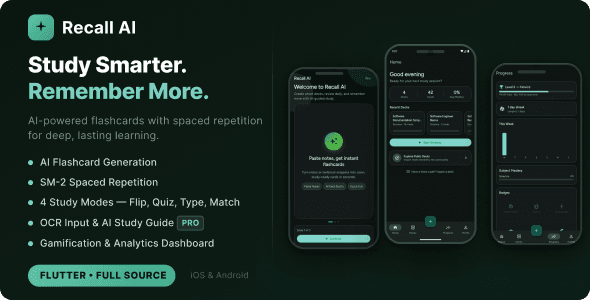
- AI flashcard generation from notes, topics or images
- SM-2 spaced repetition for optimal learning intervals
- Four study modes including flashcard flip and multiple choice
- OCR image input turns handwritten notes into decks
- AI study guide with key concepts and memory tips
- Gamification with XP, levels, streaks and badges
- Analytics dashboard tracking weekly progress and subject mastery
- In-app subscriptions via RevenueCat across four tiers
What you get
Full source project
Open it in Android Studio and run. No obfuscated files, no licence server.
Documentation
Setup, folder structure, and how to rebrand it in under an hour.
Six months support
Bug fixes and questions about how the project is put together.
Free updates
Every future version of this item, at no extra cost.
Changelog
Fixed flashcard answer readability, imported decks now display cards immediately, renamed the upload action, added the iOS photo library usage description.
Initial release with AI flashcard generation, the SM-2 engine, four study modes, gamification, analytics, deck sharing and subscriptions.
Extended licence available at checkout if you plan to charge users for the app itself.
The CodeCanyon Regular Licence covers one free end product. If you plan to charge users for the app itself, buy the Extended Licence at checkout.
Yes. Every purchase is the complete project — Flutter or Android Studio — with no obfuscated files and no runtime calls back to me.
Six months of support comes with every item, extendable at checkout. Support covers bugs in the template and questions about how it is put together.
Yes, that is what they are for. Change the package id, replace the branding and assets, and publish under your own developer account.
Wallo ships with the Next.js admin panel and Supabase schema. The others are client-side or use the API keys you supply, and each README says which.