Screwly documentation
Run it, point it at your own accounts, ship it under your own brand. Written against version 1.0.0 of the download you get on CodeCanyon.
- Version v1.0.0
- Updated Sep 2026
- Platform Flutter
- Stack Flutter · Game
- Demo APK · v1.0.0 · Android 7.0+
On this page
Interface tour
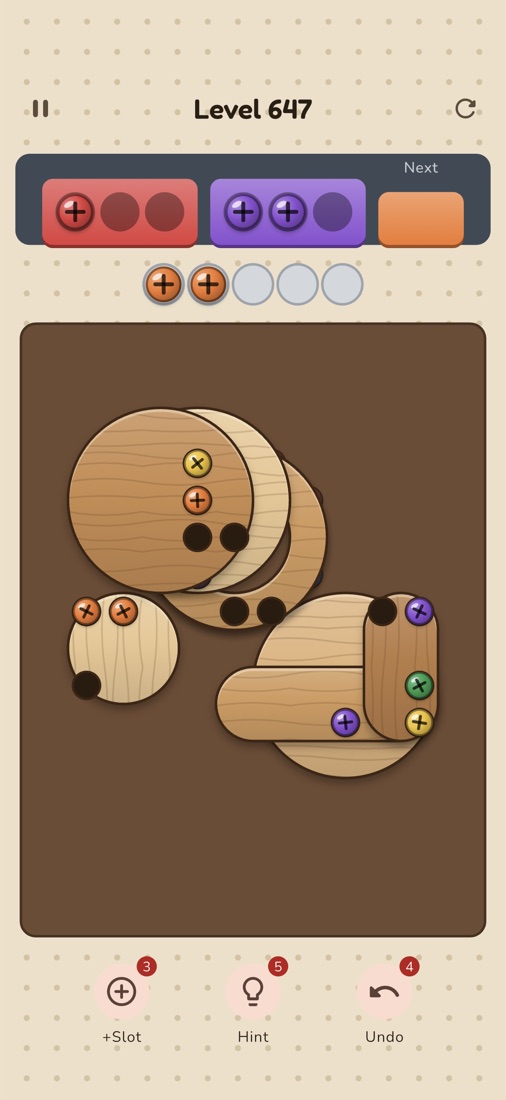
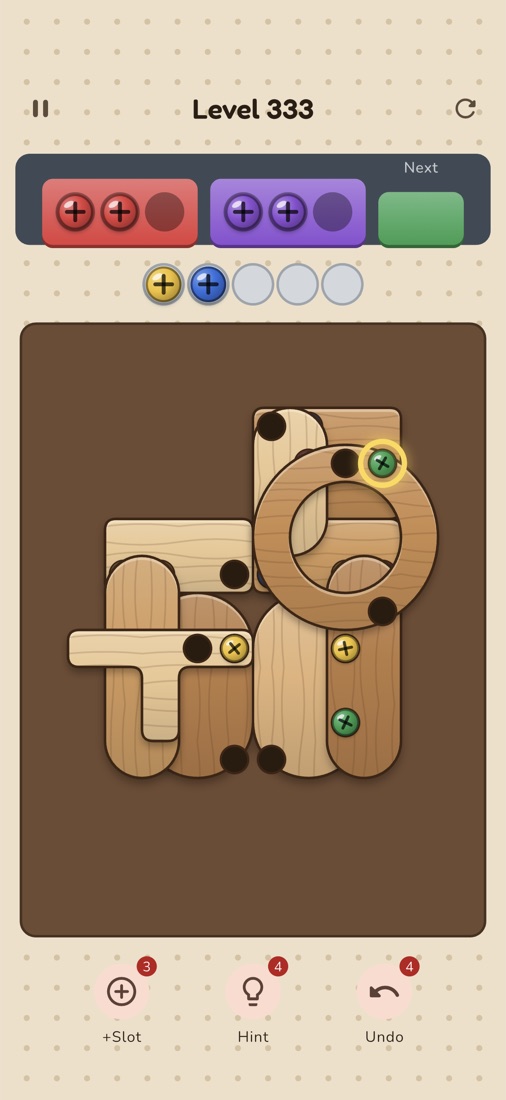
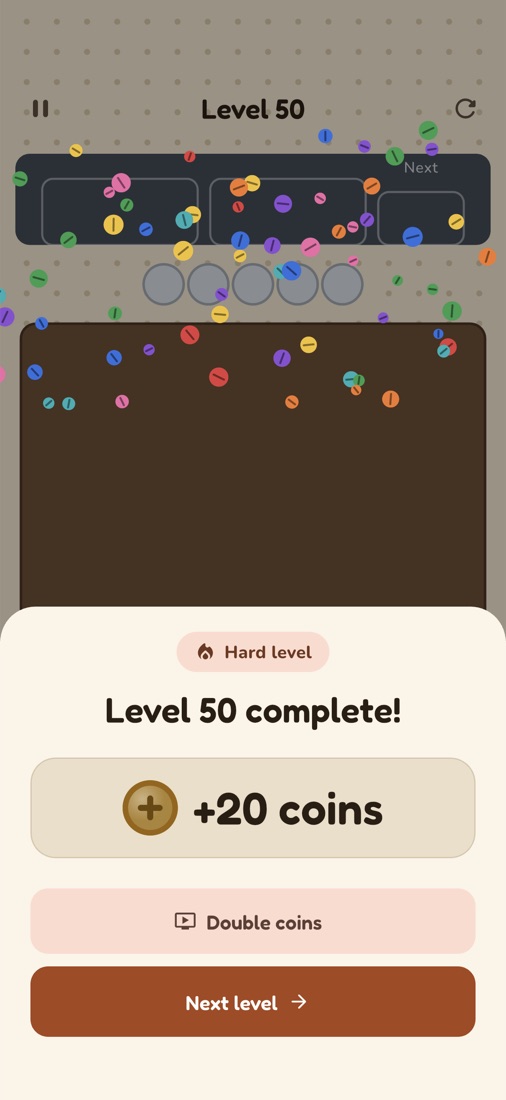
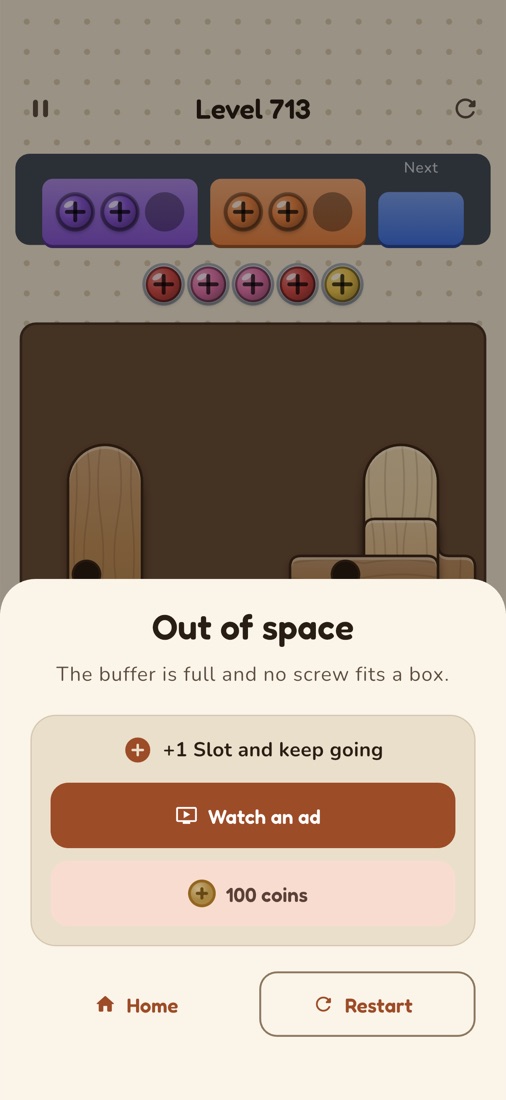
Screenshots taken from the running app on an iPhone simulator, unedited. The captions explain what each screen does. The dashed “Banner ad” strip marks where AdMob’s banner loads; in your build a real (test) banner appears there.
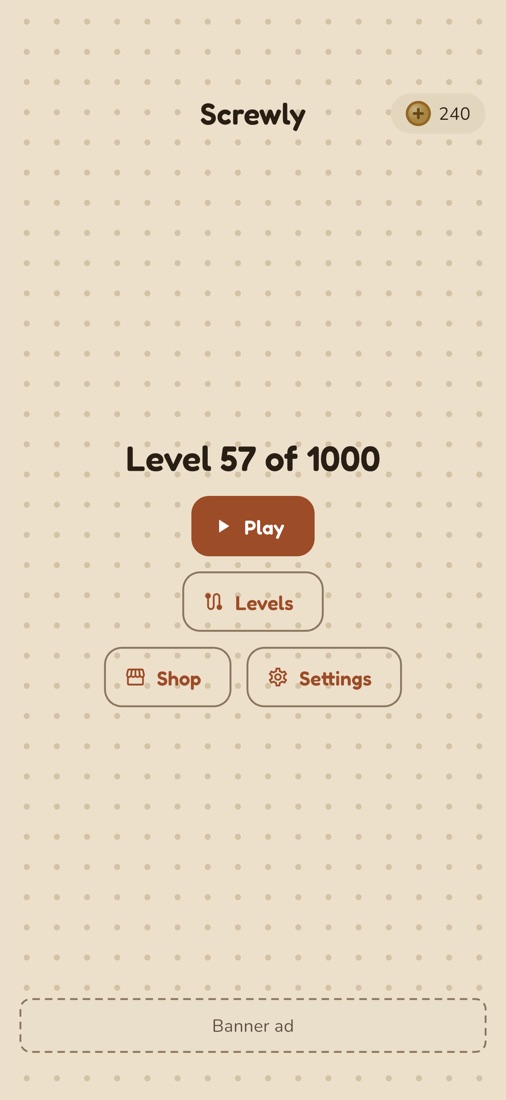
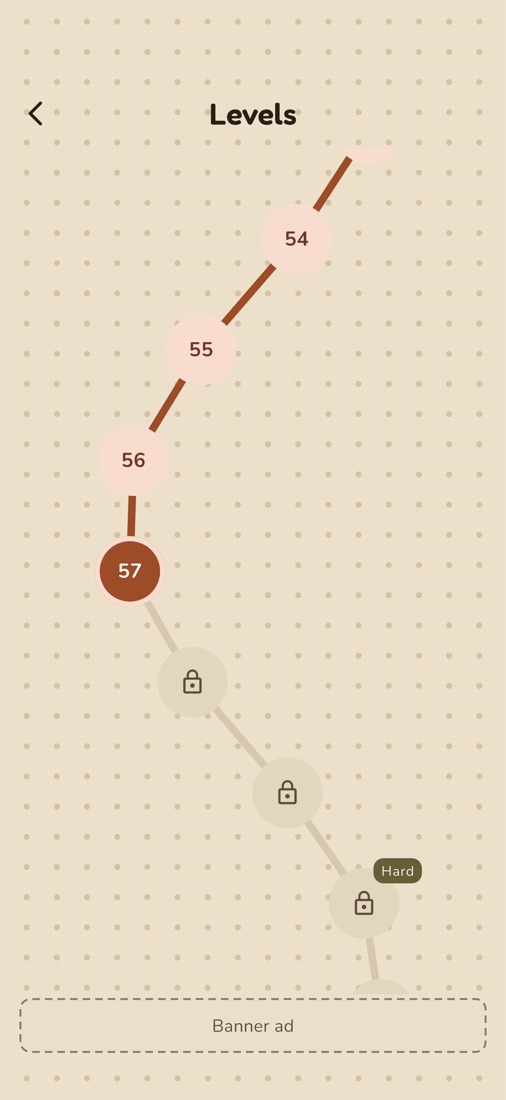
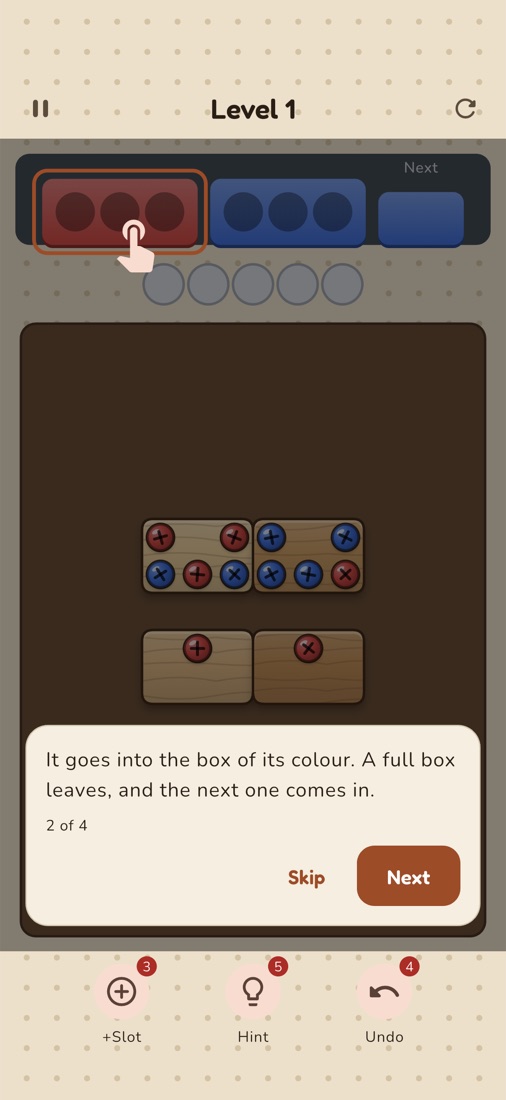
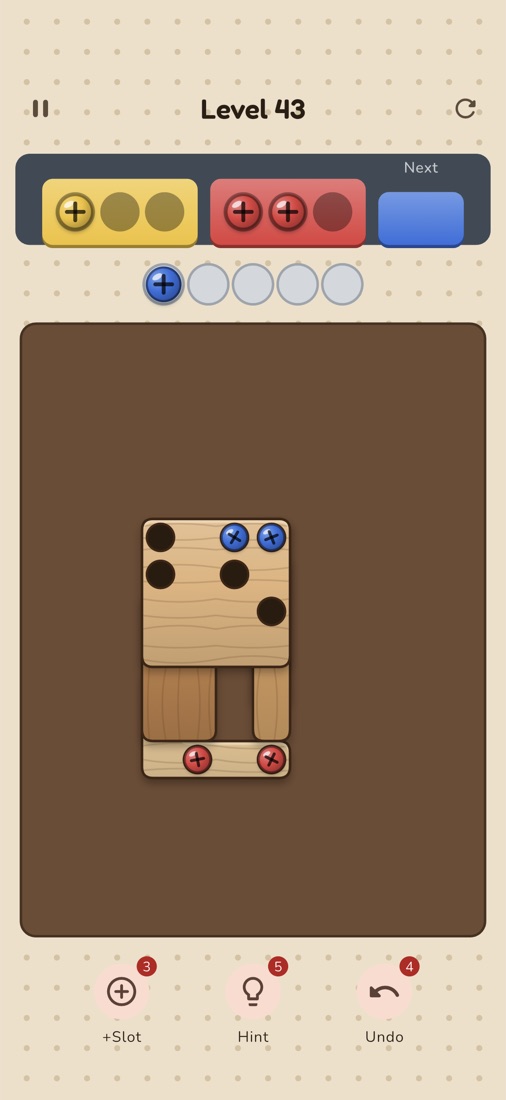
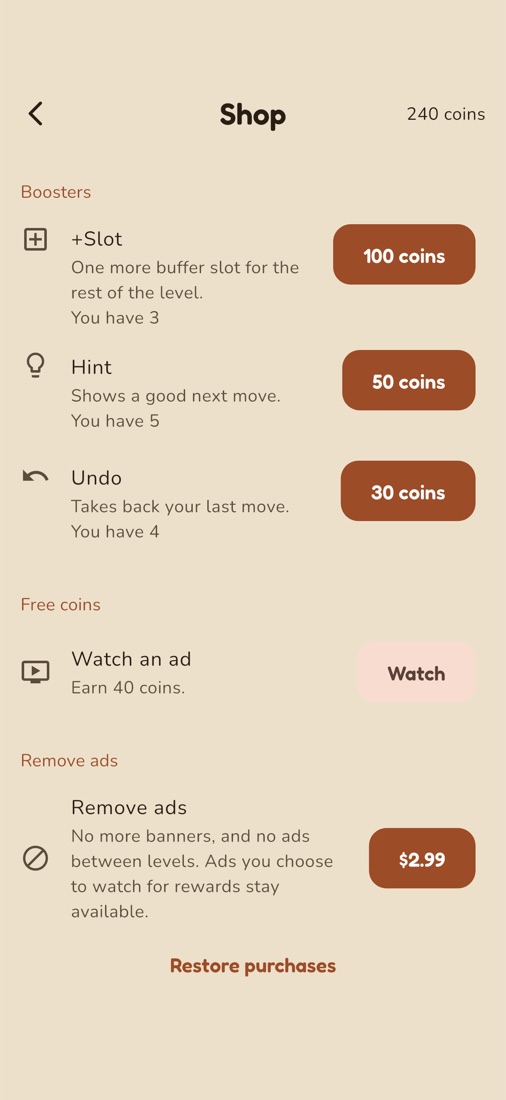
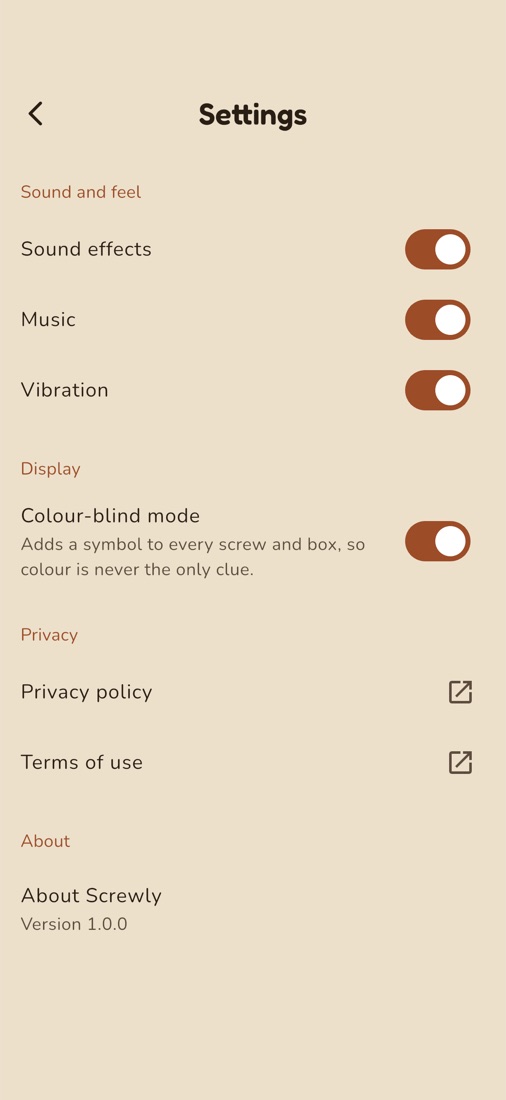
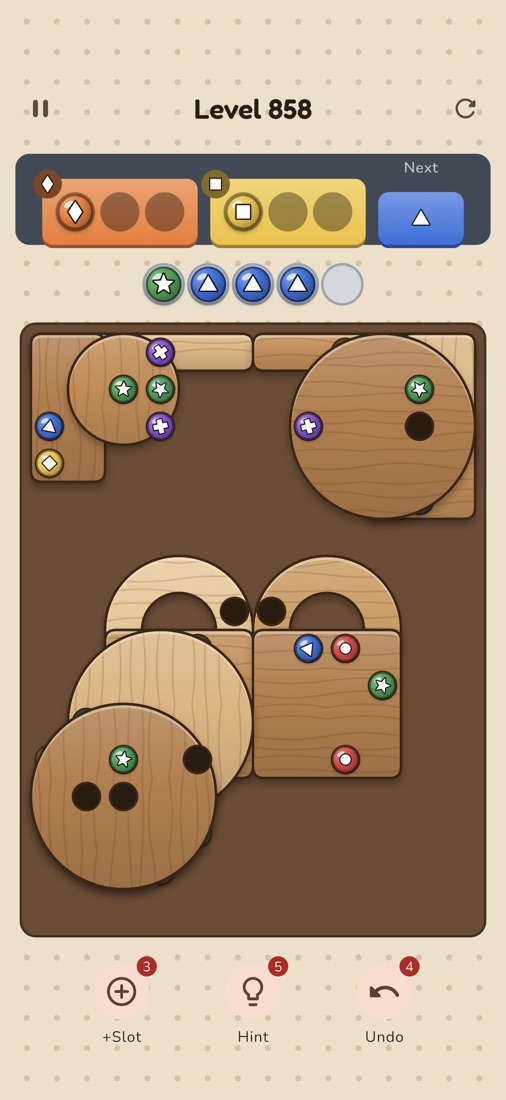
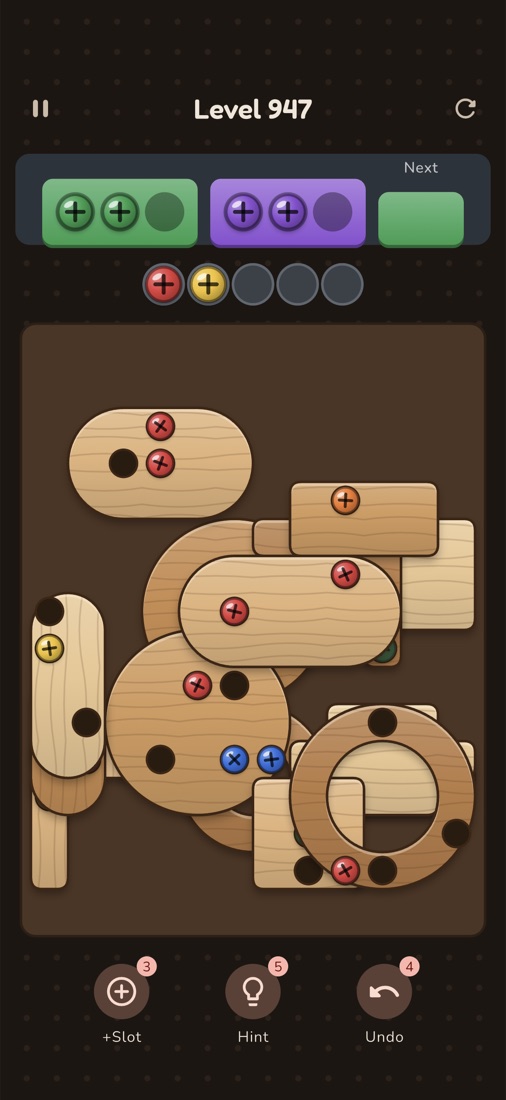
Overview
Screwly is a complete screw-sort puzzle game for Flutter. Plates are stacked in layers and held down by coloured screws. The player taps exposed screws to send each one to the box of its colour, parks screws in a few spare slots when no box matches, and clears plates to uncover the ones beneath.
The game ships with 1000 levels generated at build time. Each one is proven winnable with zero boosters by a solver that lives in the project, and the same solver powers the Hint button. A player can never be handed a level that needs a paid booster or an ad to finish.
It is a single Flutter app for Android and iOS, with a web build for demos. There is no backend: progress, coins and settings are stored on the device, so there are no server costs.
- Monetization ready: AdMob banner, interstitial and rewarded ads, Google’s consent flow (UMP), and a Remove Ads in-app purchase. It ships with Google’s test ad IDs.
- Conservative ad defaults: no interstitial before level 10, at most one every 3 completed levels, never within 90 seconds of the last, never after a loss, and never a banner over the board.
- No lives, energy or timers: restarting is always free.
- One file to reskin: name, colours, fonts, economy, ad IDs and the IAP product ID live in
lib/config/app_config.dart.
What’s included
- Full Flutter source for Android, iOS and web.
packages/screw_engine: the pure-Dart rules, solver and level generator, with its command-line level generator.assets/levels/levels.json.gz: the 1000 generated levels, each with its stored winning solution.- Light and dark Material 3 themes, bundled open-licence fonts (Fredoka and Nunito), and three plate materials: wood, brushed metal and frosted acrylic.
- App icon and splash art, drawn in code from the theme colours, with the generator configuration to rebuild them.
- English strings in
lib/l10n/app_en.arb, ready for translation. - Unit, widget and architecture tests for the app, plus the engine’s own tests.
- This documentation, a quick-start guide and
LICENSES.md. - 6 months of item support, as standard on CodeCanyon.
Features
Gameplay
- Layered plates in eight shapes: rectangle, rounded rectangle, circle, capsule, L, T, bar and ring. A screw is blocked while any plate above covers it.
- Two active boxes of 3 screws each, a queue of boxes behind them with a next-box preview, and 5 buffer slots.
- Chain reactions: a full box leaves, the next one slides in and pulls any matching screws out of the buffer, and an empty plate drops away.
- A loss happens only when the buffer is full and no exposed screw fits a box.
- Boosters:
- +Slot adds one buffer slot for the rest of the level.
- Hint shows a winning next move, or says honestly when the position cannot be won.
- Undo takes back up to 20 moves.
- A tutorial on levels 1 to 3, a free restart, and progress saved after every move, so the game resumes exactly where it was even after the app is killed.
Levels
- 1000 levels over five difficulty bands. Colours, screw counts and layers grow, and the spare room shrinks.
- Every 10th level is a Hard level: it is tighter and pays double coins. The level after it is a relief level.
- Every level is proven winnable with no boosters. The engine’s tests replay each level’s stored solution to a win.
Screens
- Splash, home, level map, game, Win sheet with confetti, Lost sheet with continue, shop and settings.
- Colour-blind mode: a symbol on every screw head and box.
- Light and dark themes that follow the device. Sound, music and vibration toggles.
Monetization
- Banner ads on home and the level map only.
- Interstitials between levels, under the rules in Ads, consent and Remove Ads.
- Rewarded ads, always the player’s choice: continue after a loss, double the win coins, free coins in the shop.
- Remove Ads, a one-time purchase: it removes banners and interstitials and keeps rewarded ads available. Restore Purchases is included.
- Google’s User Messaging Platform (UMP) for consent, with an ad-choices entry in Settings where the region requires it.
Architecture
screwly/
├── lib/
│   ├── main.dart              opens storage, prepares the wallet, registers font licences
│   ├── app.dart               MaterialApp.router with light and dark themes and localisation
│   ├── config/app_config.dart every value you change to reskin the game
│   ├── core/
│   │   ├── logic/             pure-Dart rules for ads, the level pack format and more
│   │   ├── models/            save data (freezed + json_serializable)
│   │   ├── providers/         Riverpod providers
│   │   ├── router/            go_router routes
│   │   ├── services/          storage, saves, wallet, progress, settings, audio, haptics
│   │   │   ├── ads/           AdMob and consent, behind an interface with a web no-op
│   │   │   └── iap/           the Remove Ads purchase, behind an interface with a web no-op
│   │   └── widgets/           shared widgets: coin pill, banner slot, pegboard, coin icon
│   ├── features/              splash, home, level_map, game, results, tutorial, shop, settings
│   └── l10n/                  app_en.arb and the generated localisations
├── packages/screw_engine/
│   ├── lib/src/               rules, solver, generator, difficulty bands, level pack, PRNG
│   ├── tool/generate_levels.dart  the level generator's command-line script
│   └── test/
├── assets/
│   ├── levels/levels.json.gz  the 1000 levels
│   ├── fonts/                 Fredoka and Nunito, with their OFL licences
│   └── branding/              source images for the icon and splash
├── tool/brand_art_test.dart   draws the icon and splash art from the theme colours
├── test/                      app tests, including test/architecture_test.dart
├── android/  ios/  web/
├── LICENSES.md
└── pubspec.yaml
Tech stack
flutter_riverpod 3.3 with riverpod_generatorgo_router 17freezed 3.2.5 and json_serializable (generated files are committed)hive_ce, storing JSON maps on the devicegoogle_mobile_ads 9.0.0, including Google’s User Messaging Platformin_app_purchase (StoreKit and Google Play Billing)audioplayers with a preloaded effect poolarchive, a pure-Dart gzip decoder that also works on webCustomPainter only. No game engine and no physics.flutter_launcher_icons and flutter_native_splashDesign rules the tests enforce
test/architecture_test.dart fails the build if any of these break:
- 01The engine in
packages/screw_engine/libis pure Dart: no Flutter,dart:io,dart:uiordart:isolate. The game, the Hint and the level generator all use this one package, so they can never disagree about the rules. - 02Colours and AdMob IDs appear only under
lib/config/. - 03The game screen never builds a banner. Home and the level map each place a banner slot.
- 04There is no lives, energy or timer system.
- 05The web build never compiles the ads or store plugins.
- 06
lib/core/logic/is pure Dart.
Setup and store builds
Requirements
- Flutter 3.44 or later, installed from the official Flutter site.
- Android: Android Studio with the Android SDK Platform 37 and JDK 17. The app runs on Android 7.0 (API 24) and later.
- iOS: a Mac with Xcode and CocoaPods. The app runs on iOS 17 and later.
- A device, emulator or simulator for running the app.
Run the app
flutter pub get
flutter devices                # pick a device
flutter run -d <device id>     # Android, iOS or Chrome
No account or key is needed to run it. Ads load Google’s test ads on Android and iOS; on web, ads and purchases are switched off.
Code generation
The generated *.g.dart and *.freezed.dart files are committed, so the project builds without this step. Run it only after you change a freezed model or a Riverpod provider:
dart run build_runner buildChecks
flutter analyze                          # should report no issues
flutter test                             # app, widget and architecture tests
(cd packages/screw_engine && dart test)  # rules, solver, generator and every shipped level
Android release build
- 01Copy
android/key.properties.exampletoandroid/key.propertiesand fill it in. - 02
Create an upload keystore from the
android/folder, if you don’t already have one:terminalkeytool -genkey -v -keystore upload-keystore.jks \ -keyalg RSA -keysize 2048 -validity 10000 -alias upload - 03
Build the bundle for Google Play:
terminalflutter build appbundle --release
Back up the keystore. Without it you can never update the app under the same Play listing. key.properties, *.jks and *.keystore are gitignored.
Until key.properties exists, release builds fall back to the debug key, so flutter run --release works, but a debug-signed bundle cannot be uploaded to Play.
Release builds shrink the code with R8. android/app/proguard-rules.pro keeps what AdMob, the consent SDK, Play Billing and WorkManager need; without those rules the release app can crash on launch. Always install a release build on a real device before uploading.
The SDK levels are set as numbers in android/app/build.gradle.kts: minSdk = 24, targetSdk = 37, compileSdk = 37.
iOS release build
- 01Open
ios/Runner.xcworkspacein Xcode. Under Signing & Capabilities, choose your team and set your bundle identifier. - 02
Build the archive:
terminalflutter build ipa - 03Upload it with Xcode’s Organizer or Apple’s Transporter app.
The Podfile targets iOS 17. If pod install reports that CocoaPods’ specs are out of date, run pod repo update in ios/.
Web build (for a demo)
flutter build web --release
# served from a sub-folder, e.g. example.com/screwly/:
flutter build web --release --base-href /screwly/
Upload the contents of build/web/ to any static host. Ads and purchases are off on web because neither plugin supports it.
Save data and levels
Save data
Screwly has no database server. Everything is stored on the device with Hive (lib/core/services/storage_service.dart):
- the level in progress, with its undo history, saved after every move;
- progress: the current and highest unlocked level, and whether the tutorial has been seen;
- the wallet (coins and boosters), the settings and the Remove Ads entitlement.
If you change the shape of stored data, bump AppConfig.schemaVersion and add a migration in storage_service.dart. A save that can’t be read is dropped rather than crashing the app.
Levels
The levels in assets/levels/levels.json.gz are produced by the generator in packages/screw_engine. Level n is always generated from the same seed, so regenerating gives the same levels on any machine. Each level is solved during generation, is rejected if it can’t be won without boosters, and is stored with its winning solution.
“Spare slots” is how many buffer slots, out of 5, a level leaves unused on its best line. Every 10th level is one slot tighter, and the level after it one looser.
Regenerate the levels
dart run packages/screw_engine/tool/generate_levels.dart              # 1000 levels
dart run packages/screw_engine/tool/generate_levels.dart --count 1500 # a bigger pack
dart run packages/screw_engine/tool/generate_levels.dart --help       # every option
Run it from the project root. It writes assets/levels/levels.json.gz and prints a report for every 50 levels, and it keeps a cache so an interrupted run carries on where it stopped (--no-cache starts fresh). Then run the engine tests, which replay every stored solution to a win.
levels.json.gz by hand. Always regenerate it.Third-party services and costs
This item is source code, not a hosted service. The purchase includes no hosting, no developer account, no ad network account and no credit with any provider.
The services below are run by third parties. Each one is billed to you by that third party, under pricing DevSnack does not set or control, and that pricing can change. Check each provider’s current pricing yourself before you rely on it. Any figure below is indicative and was correct when this was written.
Required to publish
No server, database or hosting is needed to run the game: it is fully offline.
Optional
What happens when an optional service isn’t set up is covered in Integrations.
Integrations
AdUnits; app IDs in android/app/src/main/AndroidManifest.xml and ios/Runner/Info.plistAdsConfig.enableAds to false to remove every ad.IapConfig.removeAdsProductId, plus a product with that ID in each storeassets/audio/Ads, consent and Remove Ads
Ad placements and rules
AdsConfig.bannerHeightinterstitialFirstLevel, interstitialEveryLevels, interstitialMinGap, interstitialAfterLossEconomyConfig.rewardedAdCoinsGoing live with AdMob
- 01Create an app for Android and one for iOS in your AdMob account, then create banner, interstitial and rewarded ad units for each.
- 02Put the unit IDs into the
_prod*strings inAdUnitsinlib/config/app_config.dart, and setAdsConfig.useTestAdstofalse. A blank production ID falls back to Google’s test unit. - 03Replace the value of
com.google.android.gms.ads.APPLICATION_IDinandroid/app/src/main/AndroidManifest.xml, and ofGADApplicationIdentifierinios/Runner/Info.plist, with your AdMob app IDs. They can’t be set from Dart, because the ads SDK reads them before Flutter starts. - 04In AdMob, under Privacy & messaging, publish a GDPR message, and an IDFA explainer message for the iOS tracking prompt. The wording of that prompt is
NSUserTrackingUsageDescriptioninInfo.plist. - 05Before each iOS release, compare the
SKAdNetworkItemslist inInfo.plistwith the current list on Google’s AdMob iOS quick-start page.
google_mobile_ads is pinned to exactly 9.0.0. Version 9.1.0 imports a private GoogleMobileAds header that Xcode refuses in a framework build (“Include of non-modular header inside framework module”). Move up only when a later release fixes that.Remove Ads (in-app purchase)
- 01In Google Play Console and App Store Connect, create a non-consumable product with the ID in
IapConfig.removeAdsProductId(dev.devsnack.screwly.remove_adsby default; change it to match your bundle ID). Where to click in each console is in the console table under Production checklist. - 02Test with a Play licence tester account and an App Store sandbox tester. Buy it, reinstall, and use Restore Purchases.
If the shop shows the price as “Unavailable”, see Troubleshooting.
Ownership is stored on the device. Remove Ads hides banners and interstitials; rewarded ads stay available, because they are how a player without coins gets unstuck.
Privacy and store forms
ios/Runner/PrivacyInfo.xcprivacydeclares the app’s own use of required-reason APIs: file timestamps for the save files, and system boot time for timers. The ads SDK and plugins ship their own privacy manifests.- Fill in the App Store privacy label and the Google Play Data safety form. Declare the data AdMob collects; the game itself collects nothing.
- Set your privacy policy and terms URLs in
AppConfig. Settings links to them.
Customization
The config file
lib/config/app_config.dart holds every value a reskin needs, one class per area:
Economy defaults
Rename the app
- 01
AppConfig.appNamefor the name shown inside the app. - 02Android:
namespaceandapplicationIdinandroid/app/build.gradle.kts; moveMainActivity.ktunderandroid/app/src/main/kotlin/to the matching package; setandroid:labelinandroid/app/src/main/AndroidManifest.xml. - 03iOS: the bundle identifier in Xcode (Runner target), and
CFBundleDisplayNameandCFBundleNameinios/Runner/Info.plist. - 04Web: the
<title>inweb/index.html, and the names inweb/manifest.json. - 05Update
IapConfig.removeAdsProductIdto your own bundle ID.
Colours, fonts and dark mode
Edit the colours in ThemeConfig. Both the light and dark themes are built from them, and test/theme_test.dart checks text contrast against WCAG AA. To use other fonts, replace the files in assets/fonts/, update fonts: in pubspec.yaml and ThemeConfig.displayFont / bodyFont, and update LICENSES.md. Keep to open-licence fonts bundled with the app; don’t use a package that downloads fonts at runtime.
App icon and splash
The icon and splash art in assets/branding/ are drawn from the theme colours. After changing the colours, redraw and regenerate:
flutter test tool/brand_art_test.dart   # redraws assets/branding/*.png
dart run flutter_launcher_icons         # Android, iOS and web icons
dart run flutter_native_splash:create   # splash screens
To use your own artwork instead, replace the four PNGs in assets/branding/ and skip the first command. The generator settings are at the bottom of pubspec.yaml; keep their colour values in step with ThemeConfig.
flutter_launcher_icons, check ios/Runner.xcodeproj/project.pbxproj. The tool can change ASSETCATALOG_COMPILER_GENERATE_SWIFT_ASSET_SYMBOL_EXTENSIONS = YES to = AppIcon; set it back to YES.Sounds
No audio files are bundled. The game looks for these files in assets/audio/:
Accepted formats. Audio plays through the audioplayers package, which uses each platform’s own decoder, so a file must be in a format that Android, iOS and browsers all play:
- Free sound libraries often offer OGG or FLAC downloads. Convert them to WAV or MP3 first; the free editor Audacity does this under File › Export Audio.
- Keep effects short (under a second is typical) at 44.1 or 48 kHz. Mono is fine for effects.
- The file names, extension included, are fixed in the
Sfxlist inlib/core/services/audio_service.dartand inAudioService.musicFile. To useclick.mp3instead ofclick.wav, either convert the file or change the name there. - A file that is missing or can’t be played is skipped silently, so check each sound on a real Android and iOS device.
Add the files, declare - assets/audio/ under assets: in pubspec.yaml, and list each file’s source and licence in LICENSES.md. Use sounds you made or that are licensed for commercial use, such as CC0.
Levels and difficulty
See Save data and levels to regenerate or enlarge the pack. The difficulty bands are defined in packages/screw_engine/lib/src/difficulty.dart.
Languages
Every string is in lib/l10n/app_en.arb. To add a language, copy it to app_<code>.arb (for example app_fr.arb), translate the values, and run flutter gen-l10n. The language picker in Settings appears once there is more than one language.
Production checklist
Steps that happen in a web console name the menu path. The paths for each console are gathered in the tables after the list.
- 01Rename the app and set your IDs:
AppConfig,android/app/build.gradle.kts, the Xcode Runner target andios/Runner/Info.plist(Customization). - 02Set the support email, website, privacy policy, terms and store URLs in
AppConfig. - 03Create the store listings: in Play Console, All apps › Create app; in App Store Connect, Apps › + › New App. For iOS, first register the bundle ID in the Apple Developer site under Certificates, Identifiers & Profiles › Identifiers › +.
- 04Create your AdMob apps and ad units (Apps › Add app, then Ad units › Add ad unit). Replace the AdMob app IDs in
AndroidManifest.xmlandInfo.plist, fillAdUnits, and setAdsConfig.useTestAds = false. - 05Publish the consent messages in AdMob under Privacy & messaging: the European regulations (GDPR) message and, for iOS, the IDFA explainer. Refresh
SKAdNetworkItemsinInfo.plist. - 06Upload a first build to a test track. Google Play won’t let you create an in-app product until a build of the app is uploaded (Test and release › Testing › Internal testing › Create new release). For iOS, upload with Xcode’s Organizer or Transporter; the build then appears under TestFlight.
- 07
Create the Remove Ads product in both stores with your
IapConfig.removeAdsProductId, as a non-consumable (a one-time purchase that is never used up), and test buying and restoring:- Google Play: Monetize with Play › Products › One-time products › Create one-time product, then activate it. Older consoles call this page In-app products. Selling anything needs a payments profile first: Settings › Payments profile.
- App Store: Apps › your app › Monetization › In-App Purchases › +, type Non-Consumable. Add a display name, a price and a review screenshot (the shop screen) until its status reads Ready to Submit. Your first in-app purchase is submitted together with an app version: add it in the version page’s In-App Purchases section. The Paid Apps agreement must be active (in the Business section, formerly Agreements, Tax, and Banking).
- 08Regenerate the icon and splash, or replace
assets/branding/. Check the Xcode asset-symbol setting afterwards. - 09Add your sounds to
assets/audio/in a supported format (Customization), declare the folder inpubspec.yaml, and updateLICENSES.md. - 10Set the version in
pubspec.yamlandAppConfig.version; a test checks they match. - 11Run
flutter analyze,flutter testand the engine tests. - 12Android: create
android/key.properties, build the app bundle, and install a release build on a real device. - 13iOS: set your signing team, build with
flutter build ipa, and test on a device. - 14Fill in the store forms: the Google Play Data safety form, ads declaration and content rating (Policy and programs › App content), and the App Store privacy label (Apps › your app › App Privacy).
- 15Once the app is live, link each AdMob app to its store listing (Apps › your app › App settings) and publish an
app-ads.txtfile on the website named in your store listing. AdMob limits ad serving to apps it can’t verify.
Where to find it in each console
Menu names are as they were at the time of writing. Google and Apple rename and move pages from time to time; if a path below doesn’t match, type the page name into the console’s search box.
.aab~)/)Troubleshooting
Most problems come from store or AdMob setup rather than from the code. The app writes a short line to the log whenever an ad, the consent form or the store fails, so start there.
Reading the log
- While developing: the terminal running
flutter runshows every line. - Android release build: connect the device and run
adb logcat. The app’s lines are taggedflutter; a crash appears underAndroidRuntimeasFATAL EXCEPTION. - iOS: run from Xcode (
ios/Runner.xcworkspace) and read its console, or open Window › Devices and Simulators and choose Open Console or View Device Logs.
IapConfig.removeAdsProductId.Ads don’t appear
Work down the list; each item is a common cause.
- 01
The placement rules are working.
There is never a banner on the game screen, and no interstitial before level 10, more than once every 3 levels, within 90 seconds of the last one, or after a loss (Ads, consent and Remove Ads). Testing an interstitial on level 2 shows nothing, by design. - 02
Ads are switched off.
AdsConfig.enableAdsisfalse, or you’re running the web build, which never shows ads. - 03
Remove Ads is owned on this device.
Banners and interstitials stay hidden after a test purchase or restore; rewarded ads still show. Clear the app’s data or reinstall to test again. - 04
Consent was refused.
In the EEA, the UK and Switzerland, no ad is requested until the player answers the consent form, and a refusal can leave no ads to serve. Change the answer from Settings, or clear the app’s data. - 05
Test ads show, real ads don’t.
Then the code is working and the cause is on the AdMob side:
- New ad units can take an hour or more to start serving, and a new AdMob account or app serves few or no ads until Google has reviewed it. The log shows “No fill” meanwhile.
- The app ID in
AndroidManifest.xmlorInfo.plistmust belong to the same AdMob app as the unit IDs inAdUnits, for that platform. An app ID contains~; a unit ID contains/. - Link the AdMob app to its published store listing and publish
app-ads.txt(Production checklist). - Never tap your own real ads. Register your phone under Settings › Test devices in AdMob so it gets test ads safely.
- 06
Real IDs were entered but test ads still show.
SetAdsConfig.useTestAdstofalse. A blank_prod*ID also falls back to Google’s test unit. - 07
No network on the emulator or simulator.
Check that a browser on it can load a page.
The consent form never shows
- 01
You’re outside the regions that require it.
Google only shows the GDPR form to players in the EEA, the UK and Switzerland. Elsewhere, nothing appearing is correct. - 02
No message is published.
In AdMob, open Privacy & messaging, create the European regulations (GDPR) message, select your apps, and publish it. Without a published message there is nothing to show. - 03
It was already answered.
The answer is remembered, so the form appears once. Clear the app’s data (Android: Settings › Apps › your app › Storage › Clear storage; iOS: delete and reinstall) to see it again. Where the region requires it, players can reopen it from the privacy entry in the game’s Settings. - 04
The iOS tracking prompt doesn’t appear.
It needs the IDFA explainer message published in AdMob, and iOS never shows it when Settings › Privacy & Security › Tracking › Allow Apps to Request to Track is off on the device.
Testing the form from outside Europe. Tell the consent SDK to treat your device as if it were in the EEA. In lib/core/services/ads/admob/admob_ad_network.dart, in _requestConsent, replace ConsentRequestParameters() with:
ConsentRequestParameters(
  consentDebugSettings: ConsentDebugSettings(
    debugGeography: DebugGeography.debugGeographyEea,
    testIdentifiers: ['YOUR-DEVICE-ID'],
  ),
)
Run the app once without it first: the consent SDK prints your device’s ID in the log, in a line that mentions addTestDeviceHashedId (Android) or testDeviceIdentifiers (iOS). Remove this change before a release build.
In-app purchases show “Unavailable”
The shop shows the Remove Ads price as “Unavailable” when the store answered but has no matching product, and says “The store is not available on this device” when it can’t reach the store at all. Check the log for Products not found:.
Both stores
- The product ID in the console must match
IapConfig.removeAdsProductIdexactly, including case. - The app’s package name (Android) or bundle ID (iOS) must match the app the product was created under.
- A newly created product can take a few hours to reach devices.
- The web build has no store, by design.
Google Play
- The product must be Active, and a build of the app must be uploaded to a testing track.
- The device must have the Play Store app and be signed in. Android emulators need a system image marked “Google Play”; others have no store.
- Your test account must be listed under Settings › License testing, added to the testing track, and have accepted the track’s opt-in link.
- “This version of the application is not configured for billing”: install the build from the testing track, or build with the same version code and signing key as the uploaded one.
App Store
- The Paid Apps agreement must be Active in the Business section of App Store Connect. Until it is, the store returns no products, even to sandbox testers.
- The product must have its display name, price and review screenshot filled in; a product showing Missing Metadata isn’t served.
- Test on a real iPhone or iPad with a sandbox account from Users and Access › Sandbox.
- “Restore finds nothing” means the account signed in on the device never bought it. Sandbox purchases belong to the sandbox account.
The release build crashes on launch
A debug build that runs and a release build that closes at once almost always means one of these. Read the crash in the log first (above).
- 01
The AdMob app ID is missing or wrong.
The ads SDK reads it before Flutter starts and stops the app if it’s absent or malformed. The log showsMissing application IDorinitialized incorrectly. Checkcom.google.android.gms.ads.APPLICATION_IDinAndroidManifest.xmlandGADApplicationIdentifierinInfo.plist: each must be an app ID (with~), not a unit ID (with/). Keep Google’s test app IDs in place even with ads switched off, because the SDK is still in the build. - 02
Android: code stripped by R8.
Release builds shrink the code, and anything the SDKs reach by reflection must be kept byandroid/app/proguard-rules.pro. The log showsClassNotFoundException,NoSuchMethodExceptionor a crash insideandroidx.roomorWorkManager. Don’t remove theproguardFiles(…)line fromandroid/app/build.gradle.kts, and if you added a plugin, add its keep rules to the file. - 03
iOS: the tracking description was removed.
NSUserTrackingUsageDescriptionmust stay inInfo.plist, because the consent flow asks iOS for tracking permission. - 04
The splash says the levels couldn’t be loaded.
That isn’t a crash:assets/levels/levels.json.gzis missing, or- assets/levels/was removed frompubspec.yaml.
To reproduce a release-only problem with the log attached, run flutter run --release on a connected device.
Build problems
google_mobile_ads: 9.0.0 exactly in pubspec.yaml; 9.1.0 causes this. Then run pod update Google-Mobile-Ads-SDK in ios/.pod repo update in ios/.dart run build_runner build.ios/Runner.xcodeproj/project.pbxproj, set ASSETCATALOG_COMPILER_GENERATE_SWIFT_ASSET_SYMBOL_EXTENSIONS back to YES.assets/audio/. Also check the toggles in Settings.android/key.properties (Setup and store builds). Without it, release builds fall back to the debug key.FAQ
AdsConfig.enableAds to false in lib/config/app_config.dart and the game shows no ads at all: no banners, no interstitials, and no rewarded offers. The Remove Ads purchase disappears from the shop, because there is nothing to remove. Players can still continue after a loss for coins. Leave Google’s test app IDs in AndroidManifest.xml and Info.plist as they are, because the ads SDK is still part of the build.Progress, coins, boosters and settings are stored only on the device; there are no accounts and no cloud save. Uninstalling deletes them, and a fresh install starts at level 1.
- Android may bring the data back on a reinstall, through the phone’s own Google backup, if the player has backup switched on. Android decides when this happens, so don’t promise it to players.
- iOS deletes the data with the app. It comes back only if the player restores the whole device from an iCloud or computer backup.
- Remove Ads is never lost. It belongs to the player’s store account: Shop › Restore purchases brings it back on any device signed in to the same account.
- Updating the app through the store keeps everything.
lib/config/app_config.dart, then following the Production checklist. Publishing needs Flutter installed and store accounts set up. Changing how the game plays needs Dart and Flutter knowledge.--count (Save data and levels). Every new level is checked for a zero-booster win before it’s written, just like the first 1000.Upgrading to a new version
When a new version of Screwly is released, you download a complete new copy of the project from your CodeCanyon downloads. Your own changes are not in it, so the job is to move them across. The changelog lists what changed in each version.
Before you customise: keep an untouched copy
The easiest upgrades use git, even if you’ve never used it for anything else. Once, before your first change:
git init
git add -A
git commit -m "Screwly 1.0.0 as downloaded"
git branch upstream          # an untouched copy of each release lives here
# now make your changes and commit them on the main branch as usual
When a new version arrives:
git switch upstream
git rm -r -q .           # removes the project's files; your keystore and key.properties stay
# now unzip the new version and copy everything inside its project folder into this one
git add -A
git commit -m "Screwly 1.1.0 as downloaded"
git switch -             # back to your branch
git merge upstream # brings in the new version and keeps your changesandroid/key.properties and your keystore are deliberately kept out of git, so deleting “everything” deletes them too, and without the keystore you can’t update your app on Google Play.git stops only where the new version and you changed the same lines, which is usually lib/config/app_config.dart. In each conflict, keep your values and keep any new settings the new version added.
Without git: what to carry across
Start from the new version and copy your changes into it, file by file. Don’t copy an old file over a new one wholesale: a new version can add settings, and the old file would drop them.
applicationId, namespace and the MainActivity.kt packageSKAdNetworkItems, bundle ID and signing teamassets/audio/ entry, fonts, icon and splash settings, and any packages you added. Keep the new version’s package versions.app_en.arbIf you regenerated the levels
- If you ran the generator with your own options, such as
--count 1500, run the same command again after upgrading, then the engine tests. Don’t copy your oldlevels.json.gzinto the new version: if the generator changed, the new tests check the pack against the new rules. - If the changelog says the generator changed, regenerated levels are different from the ones your players have. Their progress (the level they’ve reached, coins and boosters) carries over. A level they were partway through may no longer match its save; to restart any unfinished level cleanly, bump
AppConfig.schemaVersionand add a migration that clears the saved game:storage_service.dart// lib/core/services/storage_service.dart, in _migrations 2: (storage) async => storage.saves.clear(),
After upgrading
flutter pub get
flutter analyze
flutter test
(cd packages/screw_engine && dart test)
Then install the build over the previous release on a test device, and check that progress, coins and Remove Ads survive the update.
AppConfig.schemaVersion and add a migration (Save data and levels). Never rename the storage box names in storage_service.dart: that orphans every player’s save.Known limitations
- No sound files are bundled. The audio system and its toggles are in place; add your own files (Customization).
- English only. Every string is ready for translation.
- No backend: no cloud save, accounts or leaderboards. Progress stays on the device.
- No level editor. Levels come from the generator.
- Web: ads and in-app purchases are off, because neither plugin supports web.
- Portrait only on phones and tablets.
Changelog
Every version published so far. Updates are free for the life of the item.
Support and licensing
Item support is included for 6 months, as standard on CodeCanyon. It covers questions about the item and help with setup. It doesn’t include hosting, store or ad accounts, or custom development.
Licensing follows Envato’s Regular and Extended Licenses.
What support covers
- Six months of support from purchase, extendable at checkout
- Support covers bugs in the template and questions about how it is put together
- It does not cover custom feature work, third-party API changes or store review outcomes
- The Regular licence covers one free end product. Charging users for the app itself needs the Extended licence