Trovo — AI Travel Itinerary Planner & Tour Marketplace SaaS (Next.js, Stripe, Admin)
AI travel itinerary planner and tour marketplace SaaS built with Next.js, Stripe billing and a full admin panel.
What's inside
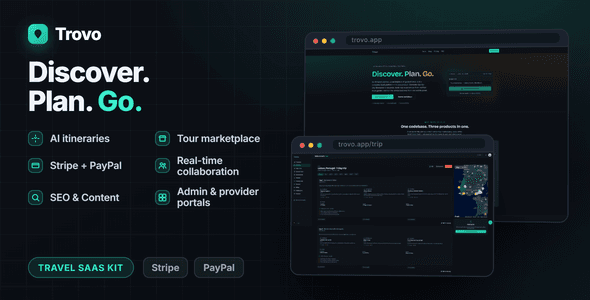
- AI itinerary generation with streaming day-by-day plans
- Multi-vendor tour marketplace with search and reviews
- Stripe and PayPal processing with subscription billing
- Admin and provider portals for platform management
- Automatic vendor payouts via Stripe Connect
- Traveller-to-provider messaging with unread notifications
- Real-time trip collaboration with live presence and comments
- White-label branding customisation at runtime
What you get
Full source project
Open it in Android Studio and run. No obfuscated files, no licence server.
Documentation
Setup, folder structure, and how to rebrand it in under an hour. Read it before you buy →
Six months support
Bug fixes and questions about how the project is put together.
Free updates
Every future version of this item, at no extra cost.
Changelog
Automatic provider payouts via Stripe Connect, traveller-to-provider messaging with unread badges, theme toggle, pricing and FAQ pages.
Fixed a production server-rendering error affecting tour, blog and legal pages.
Header and footer on marketplace tour pages, auth rate limiting, security patches, expanded docs.
PayPal recurring subscriptions, trip collaboration over SSE, embed widget, destination guides, affiliate links.
Initial release — AI itinerary generator, tour marketplace, Stripe checkout and subscriptions, admin and provider portals.
Extended licence available at checkout if you plan to charge users for the app itself.
The CodeCanyon Regular Licence covers one free end product. If you plan to charge users for the app itself, buy the Extended Licence at checkout.
Yes. Every purchase is the complete project — Flutter or Android Studio — with no obfuscated files and no runtime calls back to me.
Six months of support comes with every item, extendable at checkout. Support covers bugs in the template and questions about how it is put together.
Yes, that is what they are for. Change the package id, replace the branding and assets, and publish under your own developer account.
Wallo ships with the Next.js admin panel and Supabase schema. The others are client-side or use the API keys you supply, and each README says which.